AI Size Recommender for Shopify | The Complete SmartSize Guide
“I don’t know which size to pick.” Without a reliable size recommender, that one moment of doubt costs online apparel stores twice - first in lost sales when uncertain shoppers leave without buying, then in returns when the ones who guess get it wrong. According to Barclaycard, wrong-size returns account for 30-40% of all online apparel returns. But the shoppers who never converted? Those don’t show up in any report.
Shoppers can’t try clothes on. Size charts are confusing. Sizing varies wildly between brands. The result: abandoned carts, high return rates, and sizing frustration that silently drains revenue from both ends.
SmartSize is an AI size recommendation app for Shopify that replaces that doubt with confidence. Shoppers take a quick quiz and see exactly how their body fits in every available size - visually, interactively, and instantly. No tape measure required.
This guide covers everything SmartSize does to reduce sizing returns and increase conversion - for merchants evaluating a fit finder, and for those already using one who want to get more out of it.
In this guide:
- What is a size recommendation app?
- How the fit quiz works for shoppers
- How SmartSize shows which size fits best
- Returning shoppers
- How SmartSize reduces sizing returns
- Supported product categories
- AI size chart extraction
- Merchant setup
- Customization options
- Supported languages
- Mobile experience
- JavaScript API & integrations
- Pricing
- FAQ
What is a size recommendation app - and why does your store need one?
A size recommendation app is a tool that helps online shoppers find the right size before they buy. Instead of decoding a static size chart, the shopper answers a few questions and receives a personalized size recommendation tailored to the specific product they’re viewing.
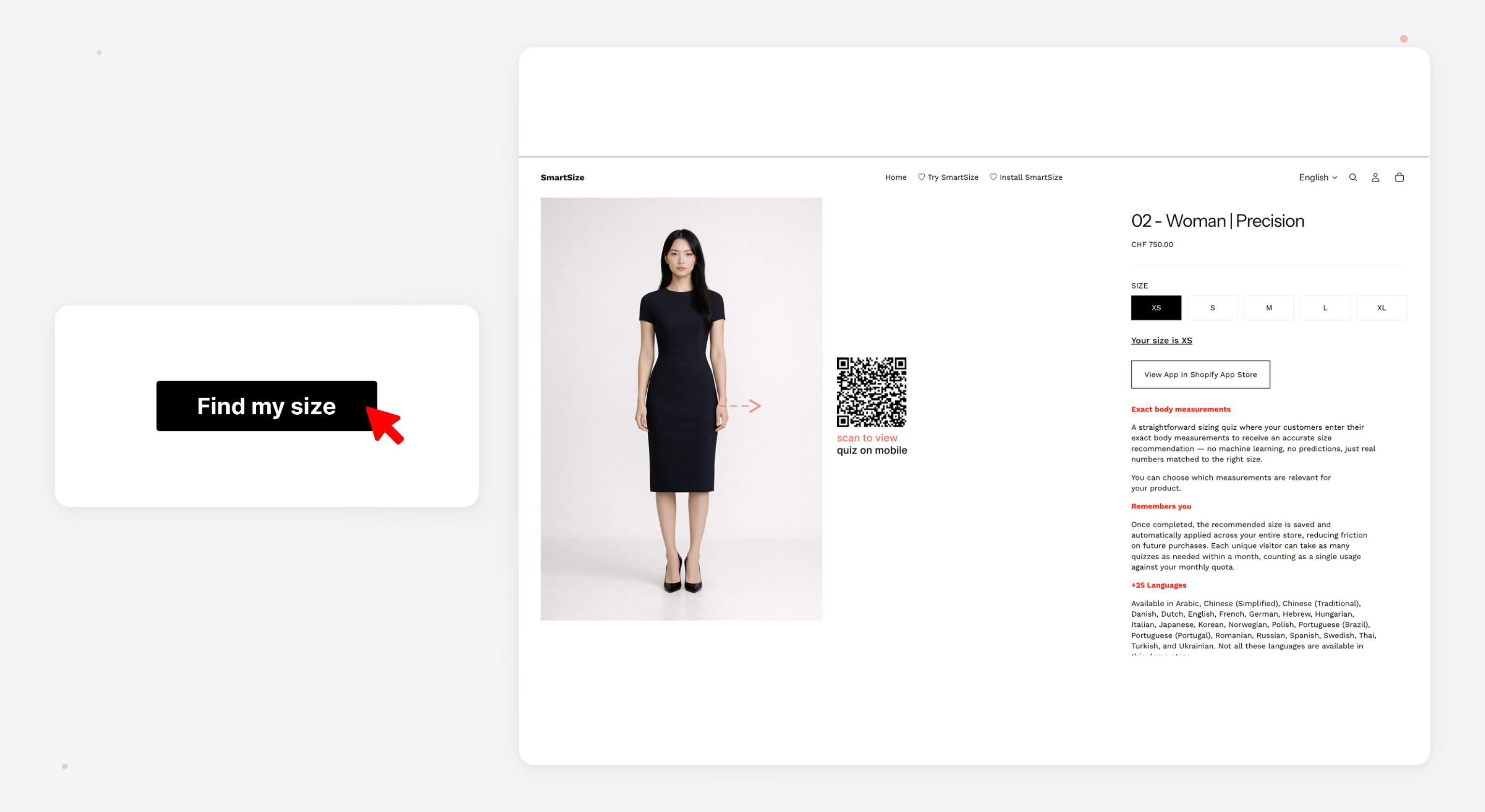
SmartSize is an AI size recommender built specifically for Shopify. It adds a “Find My Size” button to product pages. Shoppers tap it, answer a short quiz (30-60 seconds), and get an interactive, visual recommendation - not just a size label, but a full breakdown of how their body fits in each available size.
Why this matters for your store:
- Fewer returns - shoppers order the right size the first time
- Higher conversion - confident shoppers are more likely to buy
- Less support overhead - fewer “what size should I get?” emails
- Better experience - the quiz feels premium and builds trust in your brand
SmartSize isn’t a basic size chart app — it’s a fit recommender that gives your customers an experience they’ll remember.
How does SmartSize’s fit quiz work for shoppers?
The shopper experience starts with a “Find My Size” button on the product page. Tapping it opens a sleek modal. After a few quick steps, the shopper receives a personalized recommendation with a rich, interactive visualization.
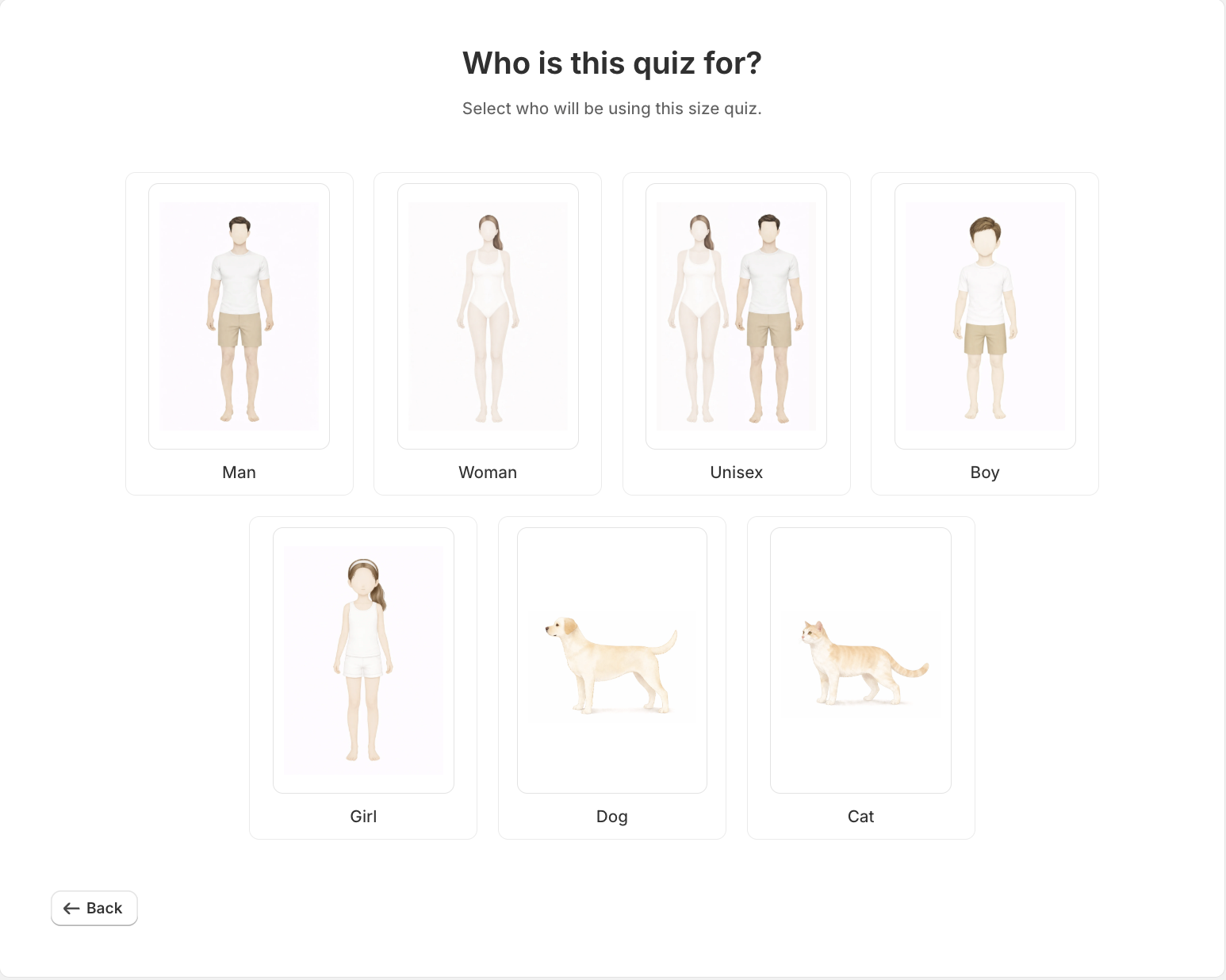
SmartSize offers two quiz types, plus a combined mode:
The Prediction Quiz (AI-Powered)
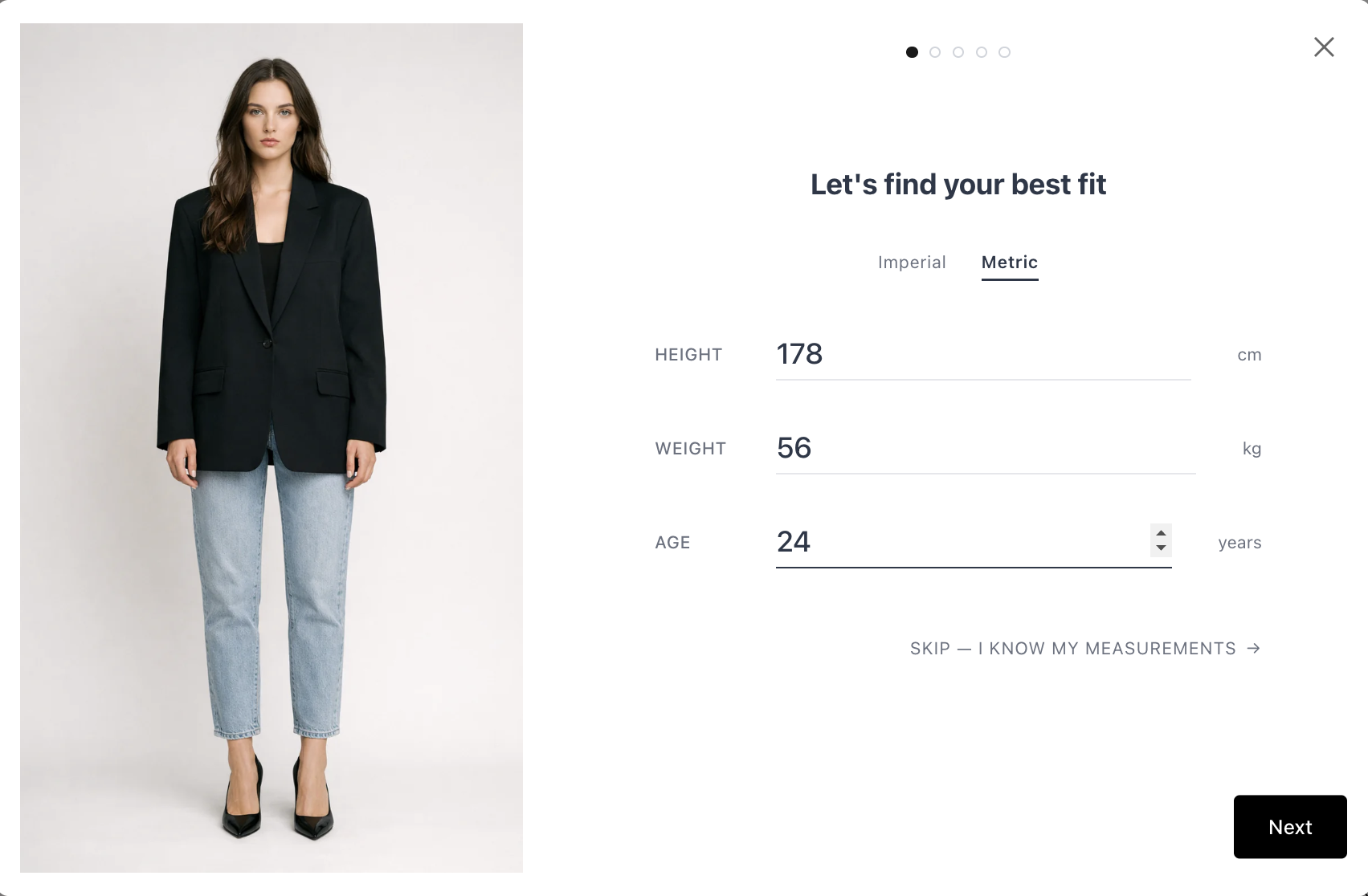
The shopper enters their height and weight, then answers 3-4 visual body shape questions - tapping illustrated cards that best match their build. A machine learning model predicts their body measurements and matches them against the product’s specific size chart.
For women (4 questions): weight distribution, waistline shape, belly shape, and optional bra size. For men (3 questions): shoulder/torso width, belly shape, buttocks shape.
This is the fastest path - no tape measure, no pre-measured numbers. It’s a body measurement quiz powered by AI, and it takes about 30 seconds.
The Precision Quiz
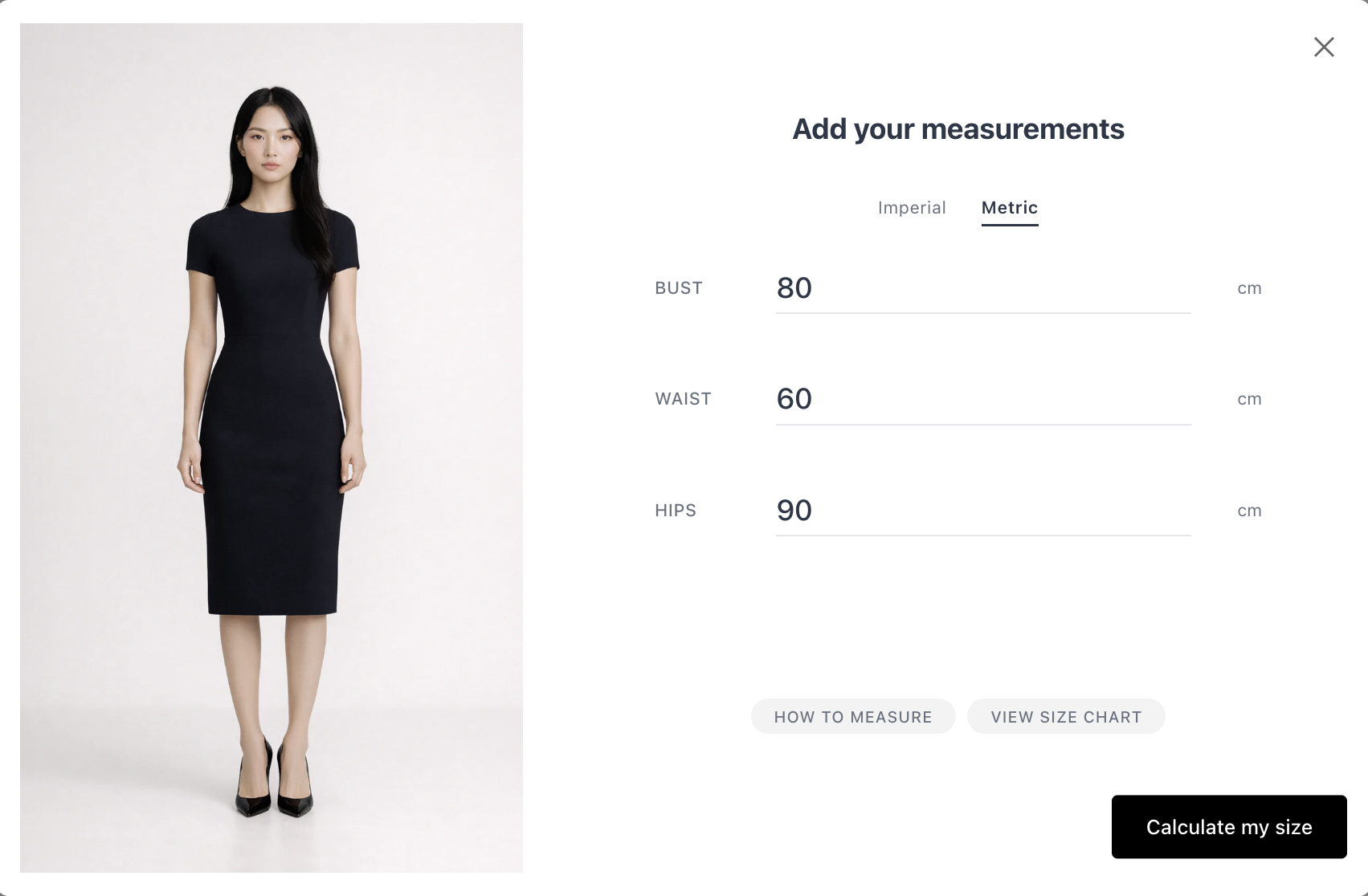
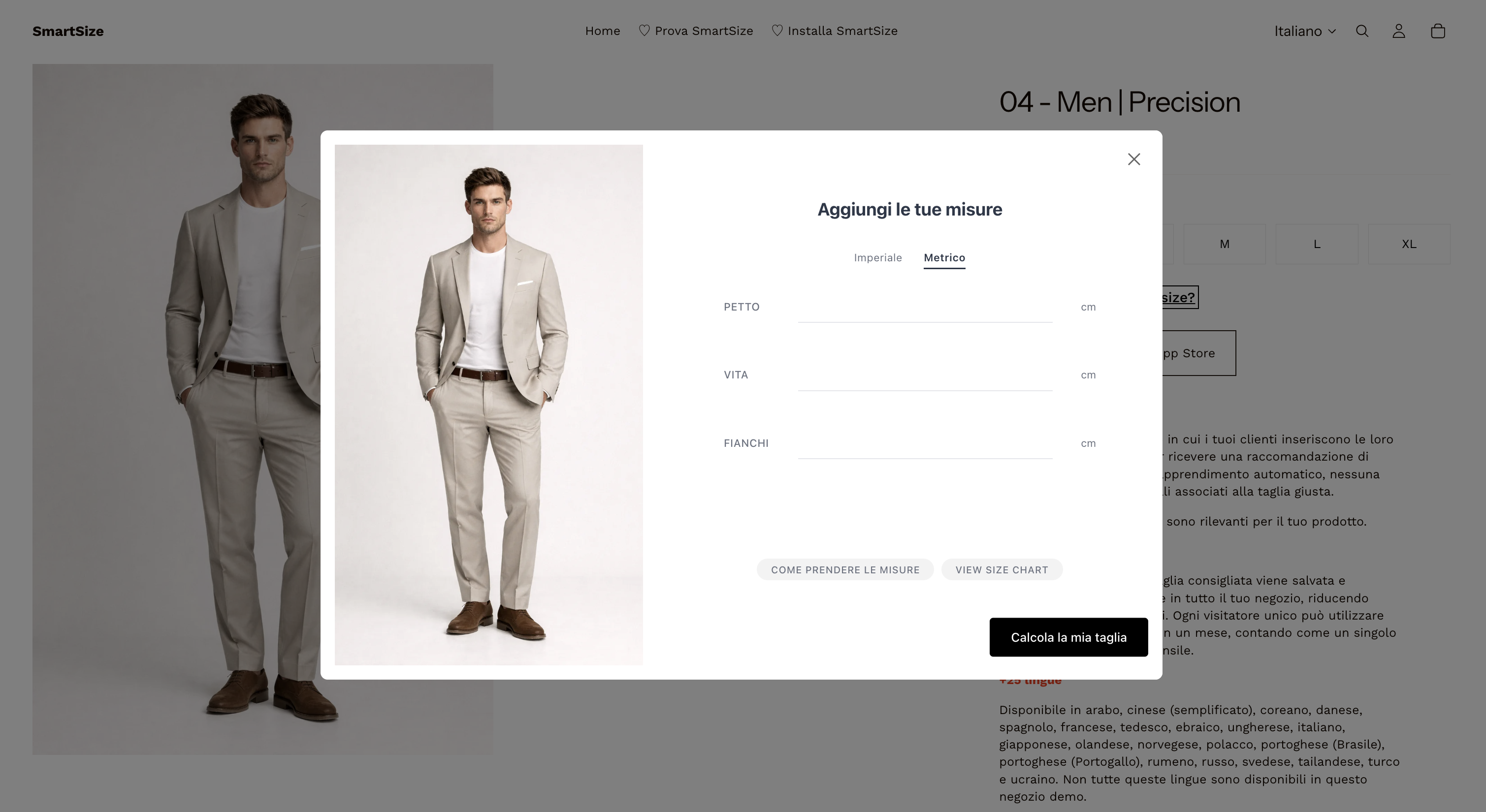
The shopper enters their actual body measurements (chest, waist, hips, inseam, etc.) for precise matching. This is ideal for shoppers who already know their numbers.
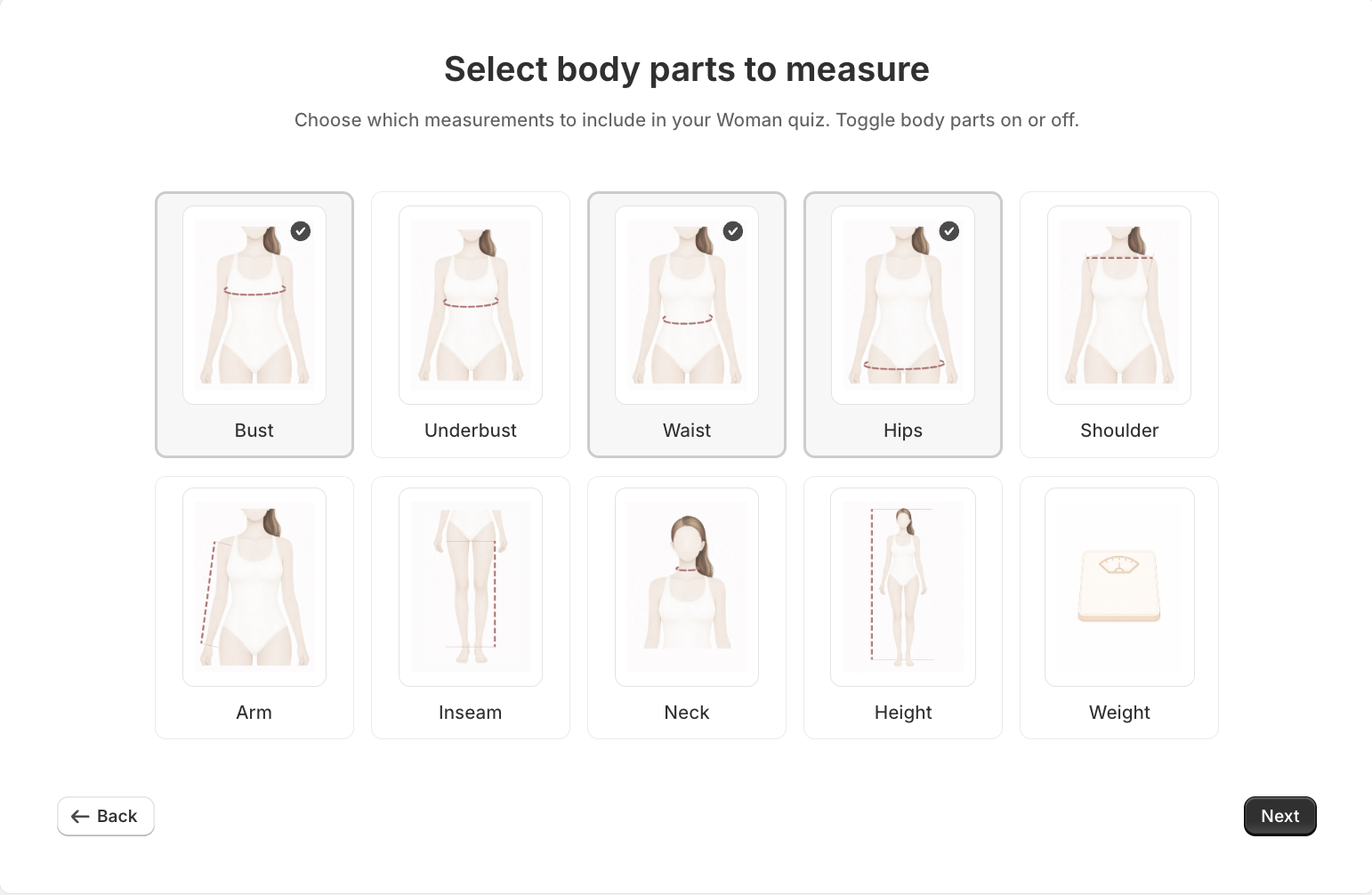
Available measurements include: chest/bust, waist, hips, inseam, neck, arm length, and height. The merchant configures which measurements are required per quiz.
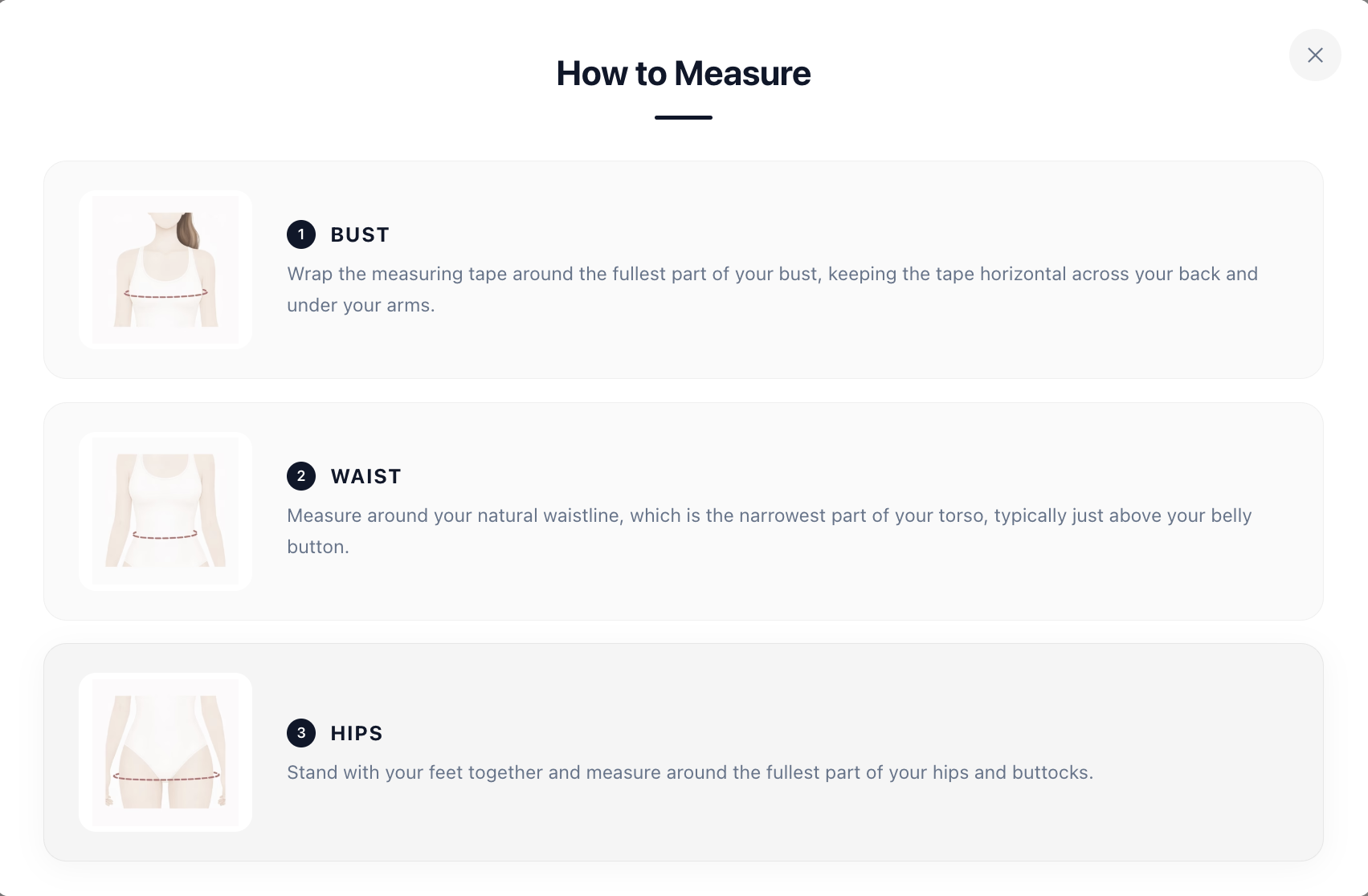
A built-in “How to Measure” guide - fully localized with illustrations - helps shoppers who need guidance.
Combined Mode (Both)
Merchants can enable both quiz types. The shopper starts with the Prediction Quiz but can switch to the Precision Quiz at any time (“I know my measurements”).
| Feature | Prediction Quiz | Precision Quiz |
|---|---|---|
| Input | Height, weight, body shape | Actual body measurements |
| Tape measure needed | No | Yes |
| Time to complete | ~30 seconds | ~60 seconds |
| AI model used | Yes (ML prediction) | No (exact matching) |
| Available for | Men’s & women’s clothing | Men’s, women’s, boys’, girls’, lingerie & pets |
Unit flexibility: Shoppers can switch between metric (cm/kg) and imperial (inches/lbs) at any time during the quiz. The default is auto-detected from the store’s locale.
Curious what the quiz feels like? Take it for a spin on our live demo store →
How does SmartSize show shoppers which size fits best?
This is where SmartSize stands apart from every other size chart app or fit finder on the market. After completing the quiz, the shopper doesn’t just see a size label - they see a full interactive fit visualization. And it starts with something every merchant already knows: the size chart.
Your size chart - but personalized
Every store has a size chart. SmartSize turns it into something better.
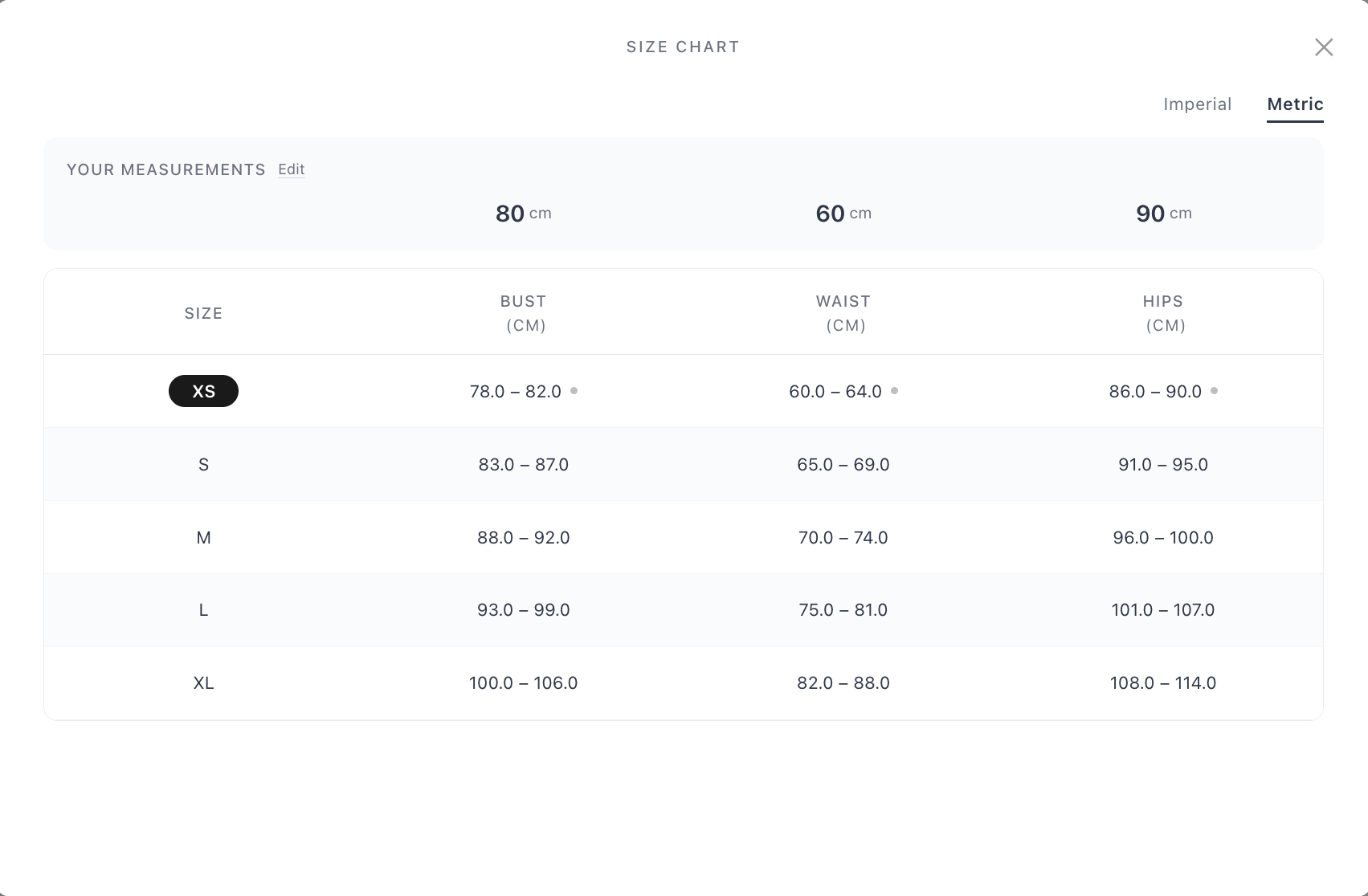
After completing the quiz, the shopper can open a full size chart view from within the recommendation screen. But this isn’t the static table they’re used to - it’s personalized with their body data:
- “Your Measurements” panel at the top - showing the shopper’s own bust, waist, and hip measurements, with an option to edit them right there
- Min-max ranges for every size (XS through XL and beyond), so the shopper can see exactly where their body falls
- Dot indicators next to measurements where the shopper sits near the boundary of a size’s range - an instant visual cue for between-sizes situations
- Recommended size highlighted - the best-fit size is visually marked in the table
- Imperial / Metric toggle - switch units on the fly without leaving the chart
A shopper who completes the Prediction Quiz sees their predicted measurements overlaid on the chart. A shopper who completes the Precision Quiz sees their exact numbers. Either way, a static table becomes a personalized comparison tool.
The size chart is accessible even before completing the quiz - it just shows the clean, standard table without personalization. After the quiz, it upgrades automatically.
This matters because many shoppers still prefer looking at a size chart. SmartSize doesn’t take that away - it makes it better. And for merchants, it means the size chart they already maintain does double duty: it powers the recommendation and gives confident shoppers a richer self-service experience.
Mannequin Viewer
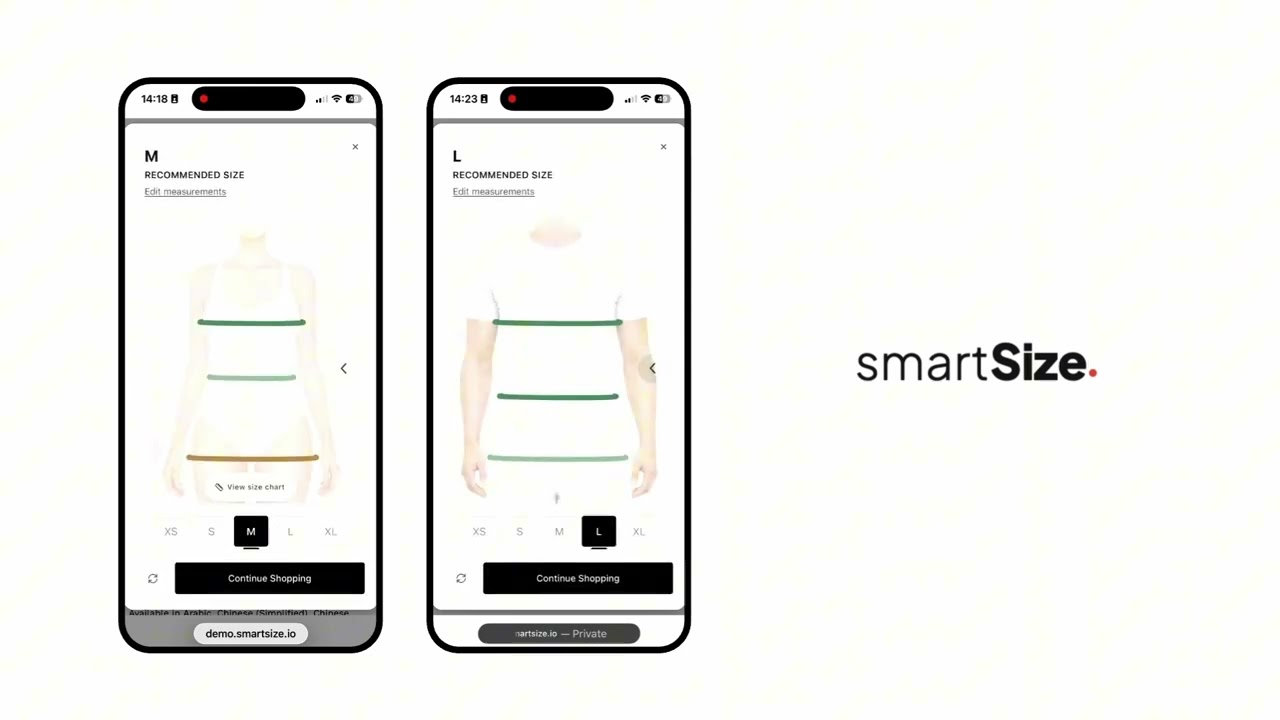
Beyond the size chart, the recommendation screen includes a body silhouette showing how the recommended size fits the shopper’s body. It updates in real time as the shopper explores different sizes. SmartSize works as a virtual fitting room alternative — shoppers see how each size fits their body without a camera, an app download, or the awkwardness of AR try-on tools.
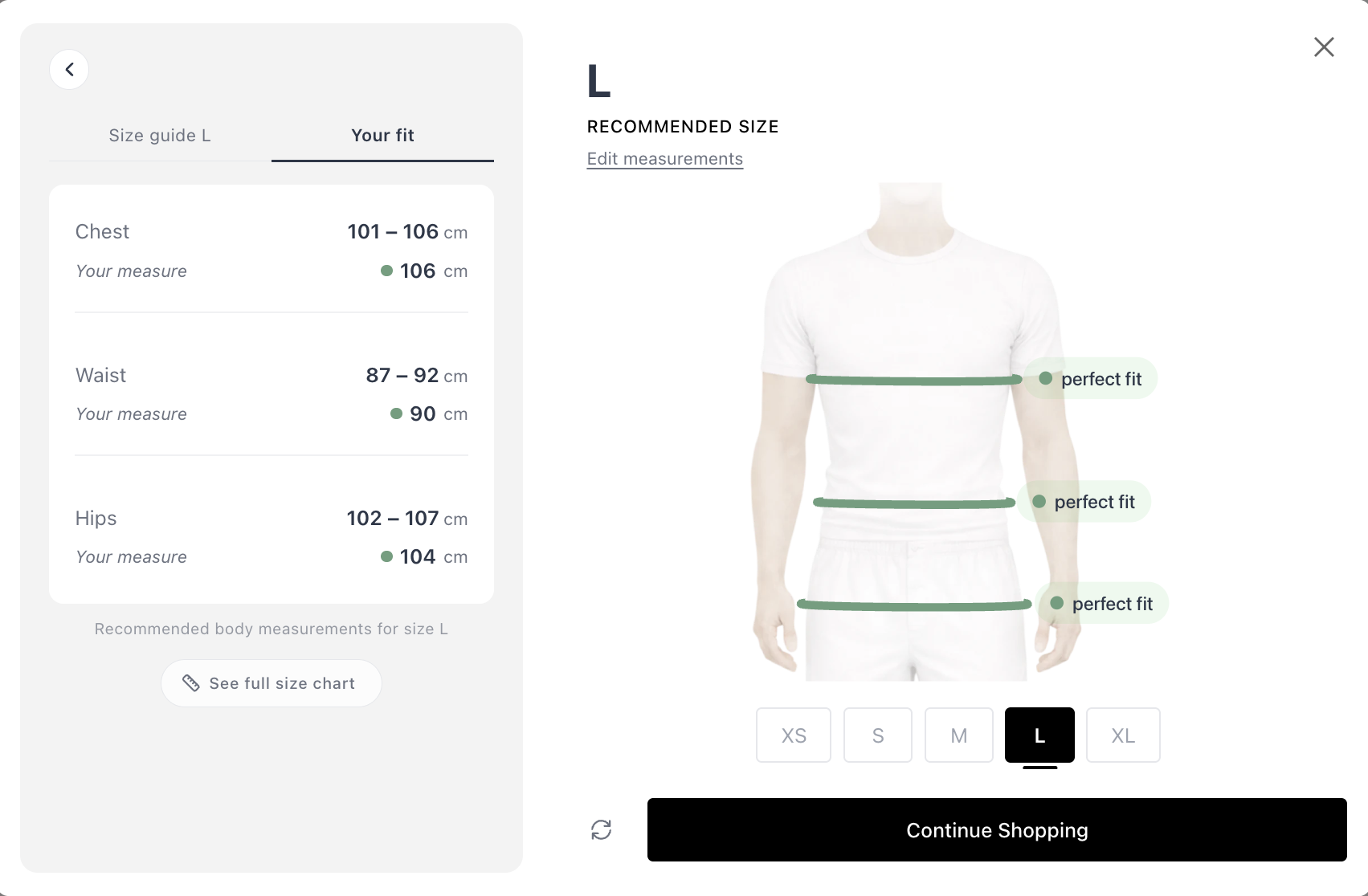
Fit Bars (Per-Measurement Breakdown)
Color-coded bars for each body measurement (chest, waist, hips, etc.) showing how well the shopper’s body fits within the size’s range:
- 🟢 Green - good fit
- 🟡 Amber - snug or loose
- 🔴 Red - too tight or too loose
Tapping a measurement highlights the corresponding area on the mannequin.
Size Explorer Carousel
A horizontal carousel (XS, S, M, L, XL, etc.) that lets the shopper swipe through every available size. As they navigate:
- The mannequin updates
- The fit bars recalculate
- The size chart highlights the selected size
This gives shoppers the confidence to make an informed decision rather than blindly trusting a single recommendation.
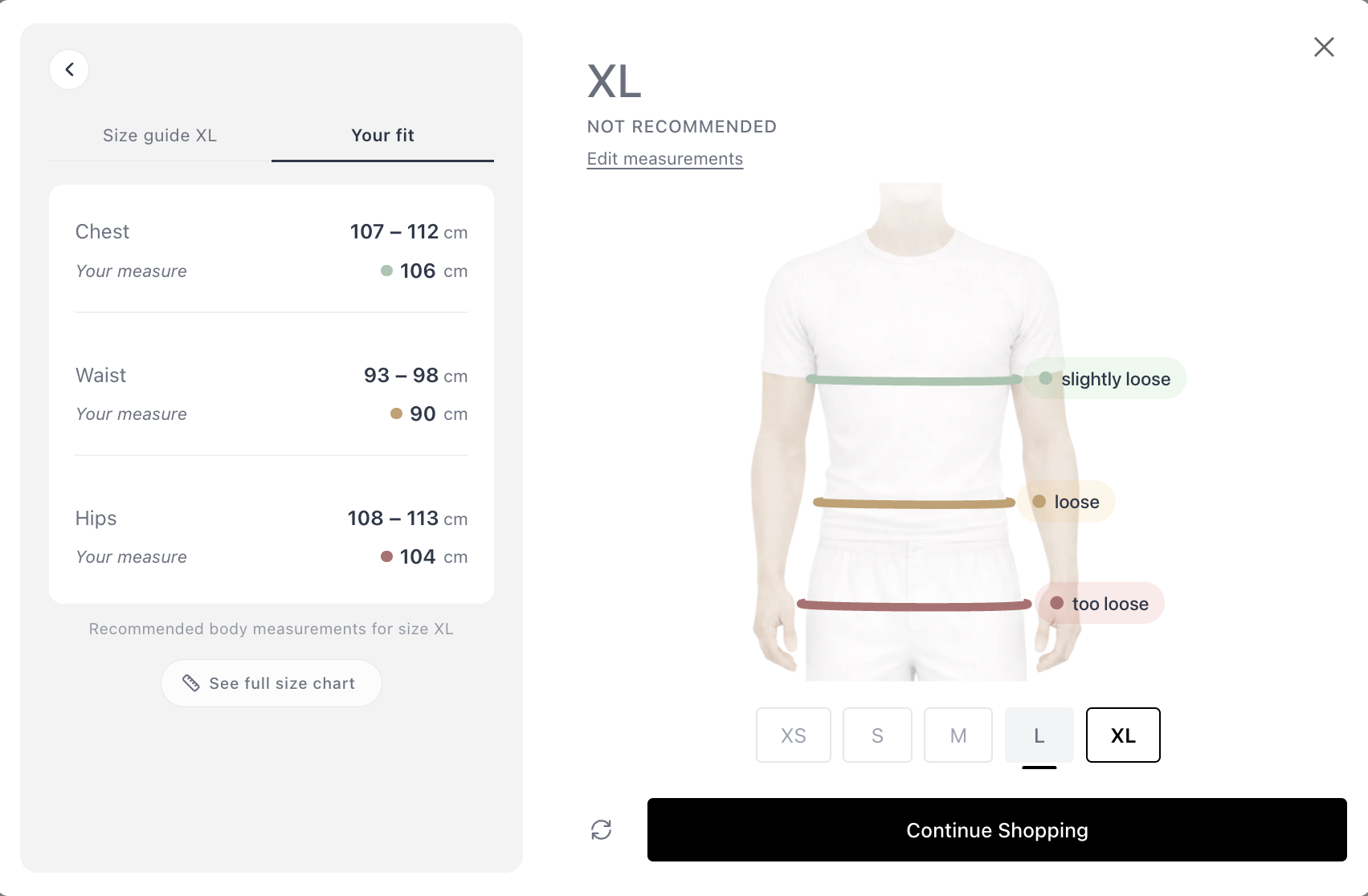
Between-Sizes Handling
If the shopper falls between sizes, SmartSize doesn’t just pick one and hope for the best. The best-fitting size is shown by default, but if any individual measurement would benefit from a different size, this is visually indicated - inviting the shopper to explore and decide for themselves.
Want to see the mannequin, fit bars, and size explorer in action? Try it live on our demo store →
→ Try SmartSize free on your store
What happens when a shopper comes back?
A good fit finder remembers your customers — and SmartSize does exactly that. After completing the quiz once, the shopper’s measurements are stored locally in their browser. On subsequent visits:
- No need to retake the quiz. When the shopper views any product with a quiz, SmartSize automatically matches their stored measurements against that product’s specific size chart.
- Works across products and brands. Even if different products in your store have different size charts, the matching happens on the fly - the shopper gets a personalized size recommendation for each product without lifting a finger.
- The button updates. The “Find My Size” button changes to show the stored recommendation (e.g., “Your size is M”) - the text template is customizable.

- 90-day refresh. Stored measurements are cleared after 90 days. This ensures accuracy in case of body changes over time.
How does SmartSize reduce sizing returns?
Size-related returns are the single biggest category of apparel returns. A size recommender tackles this problem at the source — before the shopper clicks “Add to Cart.”
SmartSize reduces sizing returns in three ways:
- Right size, first time. The fit quiz matches each shopper’s body to the product’s specific size chart. No guessing, no generic S/M/L advice.
- Confidence at the point of decision. The interactive fit visualization — mannequin, fit bars, size explorer — lets shoppers see how each size fits. Confident shoppers order the right size and keep it.
- Returning shoppers get instant recommendations. Stored measurements mean repeat visitors see their recommended size immediately — reducing the chance of a rushed, wrong decision.
The result: fewer wrong-size orders, fewer returns, and lower reverse-logistics costs. For most apparel stores, even a 10-15% reduction in sizing returns pays for the app many times over.
→ Try SmartSize free on your store
What product categories does a size recommender need to cover?
Most size recommendation apps only handle standard clothing. SmartSize goes further.
| Category | Quiz Types | AI Model | Key Measurements |
|---|---|---|---|
| Women’s clothing | Prediction + Precision | ✅ Yes | Chest/bust, waist, hips + optional inseam, neck, arm, height |
| Men’s clothing | Prediction + Precision | ✅ Yes | Chest, waist, hips + optional inseam, neck, arm, height |
| Girls’ clothing | Precision only | - | Chest/bust, waist, hips, inseam, neck, arm, height |
| Boys’ clothing | Precision only | - | Chest, waist, hips, inseam, neck, arm, height |
| Lingerie | Precision only | - | Bust, underbust, waist, hips |
| Dogs 🐕 | Precision only | - | Neck, chest, back length, weight, girth |
| Cats 🐈 | Precision only | - | Neck, chest, back length, weight |
| Horses 🐎 | Precision only | - | Neck, chest, girth, wither, back length |
Whether you’re a fashion brand, a lingerie size recommender, a pet sizing app, or a bespoke tailor - SmartSize has a quiz type for your products.
Want the category-by-category breakdown? Read our guide to fit quizzes for men, women, kids & pets — with demo videos, measurement details, and setup tips for each category.
→ See SmartSize in action - install free
How does AI size chart extraction replace manual data entry?
Most merchants don’t have their size data in the min-max format that a size guide app needs. Reformatting size charts manually is tedious and error-prone.
SmartSize solves this with AI-powered size chart extraction:
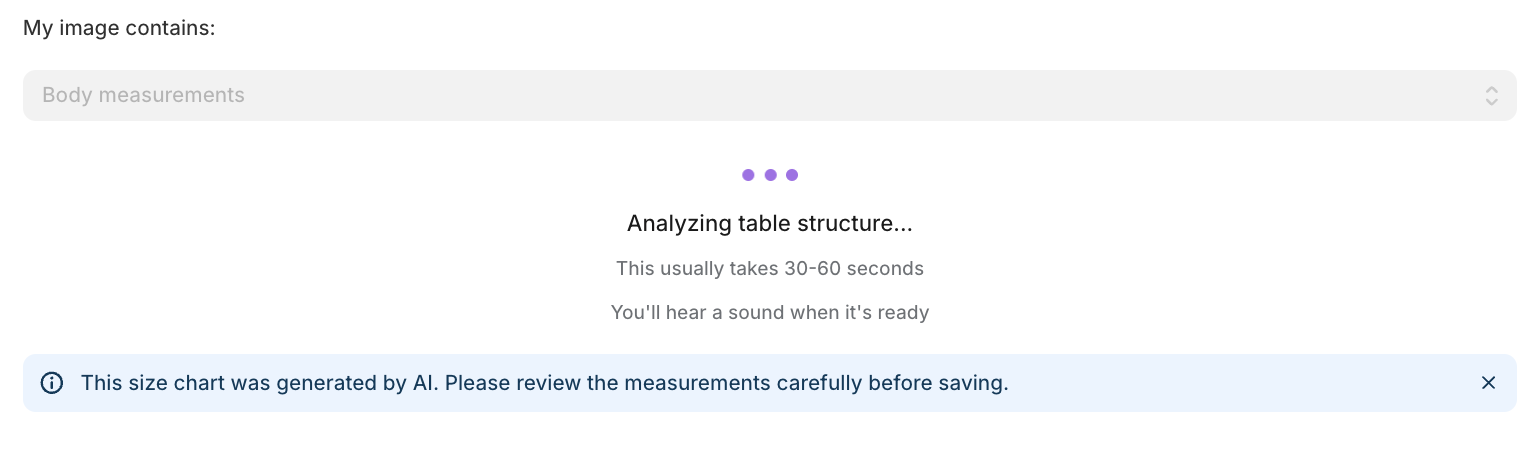
- Upload an image - screenshot, photo, or file of any existing size chart
- AI extracts the data - a large language model with vision capabilities reads the chart and structures the data automatically
- Smart conversions - the AI handles two tricky transformations:
- Garment measurements → body measurements (e.g., “across chest: 52cm” becomes an actual body measurement range)
- Single-point values → min-max ranges (e.g., “chest: 96cm” becomes a workable range)
- Chat refinement - the extraction appears in a chat interface where you can ask for adjustments, correct errors, and refine until satisfied
- Revert anytime - a “Revert to original” option is always available
This is AI sizing applied to the merchant experience - not just the shopper side. It’s the kind of clothing fit technology that turns a painful task into a 2-minute conversation. No spreadsheet reformatting, no manual conversions. Upload and go.
Prefer a DIY approach? Learn how to convert garment measurements to body measurements using ChatGPT — free, no app required.
How do merchants set up SmartSize?
Getting SmartSize live as your store’s fit finder takes 4 steps:
- Create a quiz - select the product category, gender, upload or enter the size chart, and link the quiz to products
- Add SmartSize to your theme - insert the app block in the Shopify theme editor (Online Store 2.0)
- Customize the design - adjust button appearance, accent color, and optional settings
- Review - preview how it looks and works on your live store
Linking quizzes to products
A single quiz (size chart) can cover many products. Link a quiz using any combination of:
- Specific products (by product ID)
- Collections (all products in a collection)
- Product types (e.g., “T-Shirts”)
- Vendors (e.g., “Nike”)
- Tags (e.g., “summer-2026”)
When using multiple association types, choose ANY (match if any condition is met) or ALL (match only if every condition is met). A priority setting resolves conflicts when multiple quizzes could match a single product.
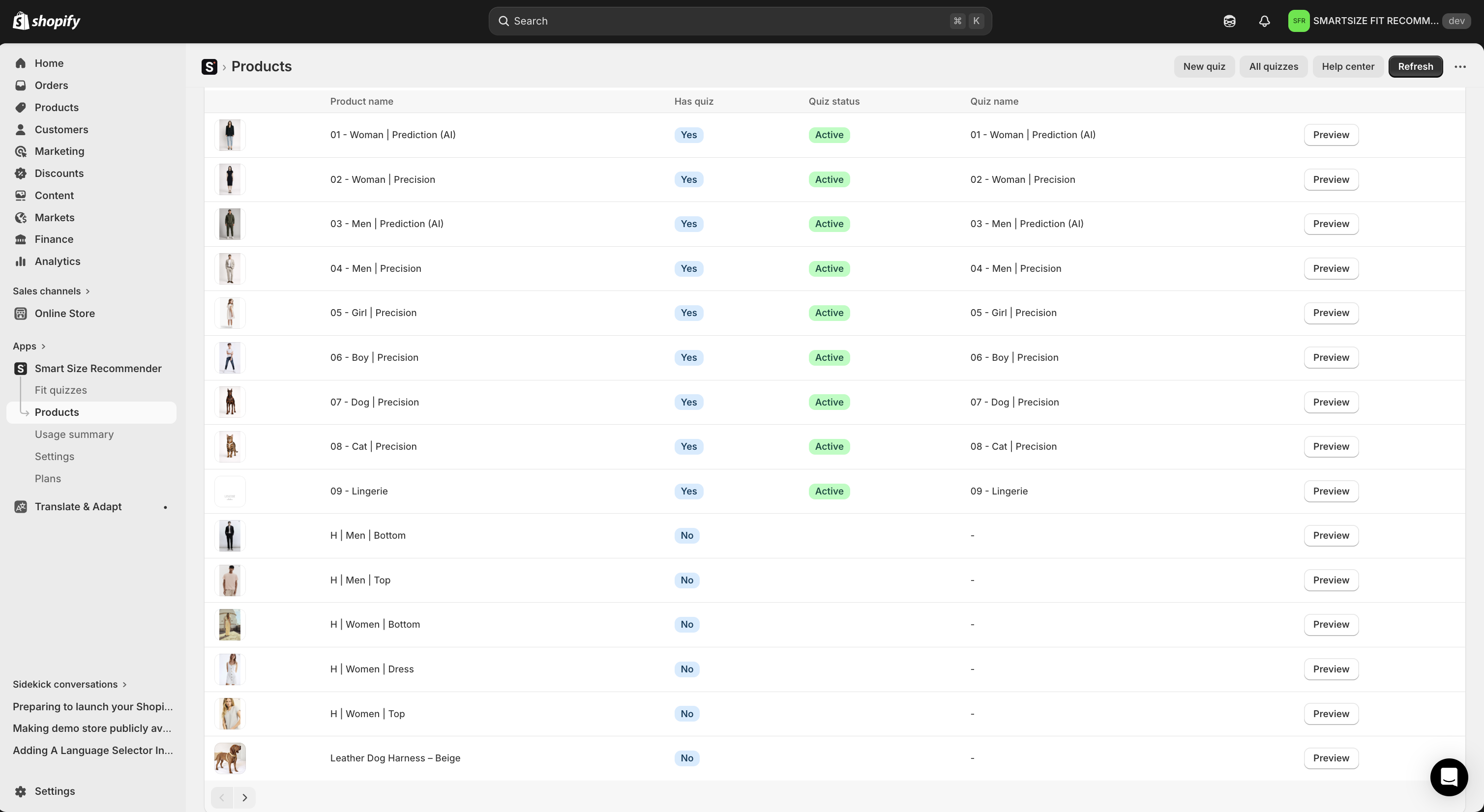
Product coverage view
The app provides a product list view showing every product in your store - making it easy to see which products have a quiz, which don’t, and which quiz is linked to each product. No guesswork about coverage.
→ Get SmartSize live in 10 minutes - start free
How customizable is SmartSize as a Shopify size chart app?
Everything is configurable - from the button to the quiz to the matching algorithm.
Button appearance
| Setting | Options |
|---|---|
| Button text | Any text (default: “Find my size”) |
| Recommendation text | Template with [[recommendedSize]] placeholder |
| Style | Button or Link |
| Icon | 16 options: Hanger, Ruler, Table/Arrows - each in 5 colors, or no icon |
| Colors | Text color + background color (any color) |
| Alignment | Separately configurable for desktop and mobile (Left / Center / Right) |
Quiz popup
| Setting | Options |
|---|---|
| Accent color | Any color - applied to primary buttons, selected states, highlights |
| Default unit | Auto-detect from locale, force metric, or force imperial |
| Support link | Optional - custom text and URL (or mailto:) shown in the quiz |
Garment fit
SmartSize’s fit algorithm is configurable at store level — set a default that tells the algorithm how your garments are designed to fit the body. This can be overridden per quiz.
| Fit type | Best for |
|---|---|
| Regular fit | T-shirts, jeans, casual wear — sizes ranked by overall fit |
| Structured / fitted | Blazers, dress shirts, tailored suits — a size is skipped if any measurement falls outside range |
| Body-hugging / slim | Leggings, compression wear, shapewear, performance gear |
| Relaxed / flowy | Hoodies, oversized tees, kaftans, wedding dresses |
Advanced positioning
For themes where the app block position isn’t ideal, use CSS selector positioning to automatically place the button relative to any element (e.g., .product-form__buttons). Choose insertion method: before, after, append inside, or prepend inside.
CSS isolation (Shadow DOM)
SmartSize uses Shadow DOM - a web standard that completely isolates the quiz widget’s styles from your Shopify theme. Your theme’s CSS never breaks the quiz. The quiz’s CSS never interferes with your theme. It works consistently on every store, every theme.
For deeper customization, every element in the widget has a CSS class prefixed with smartrecom- that you can target in your theme’s stylesheet.
What languages does SmartSize support?
SmartSize ships with 26 languages - and the quiz automatically displays in the language your customer has selected in your store. No configuration needed.
| Language | Code | Language | Code | |
|---|---|---|---|---|
| Arabic | ar | Japanese | ja | |
| Chinese (Simplified) | zh-CN | Korean | ko | |
| Chinese (Traditional) | zh-TW | Norwegian | nb | |
| Czech | cs | Polish | pl | |
| Danish | da | Portuguese (Brazil) | pt-BR | |
| Dutch | nl | Portuguese (Portugal) | pt-PT | |
| English | en | Romanian | ro | |
| Finnish | fi | Russian | ru | |
| French | fr | Spanish | es | |
| German | de | Swedish | sv | |
| Hebrew | he | Thai | th | |
| Hungarian | hu | Turkish | tr | |
| Italian | it | Ukrainian | uk |
Need a language that’s not listed? Request it via email - it’ll be available within 2 days.
The only text requiring manual translation is the “Find My Size” button label, which you can handle through Shopify’s free Translate & Adapt app. Everything inside the quiz is automatic.
Locale-aware units: Shoppers from the US automatically see inches/lbs. Shoppers from Europe see cm/kg. They can always toggle.
Does SmartSize work as a fit finder on mobile?
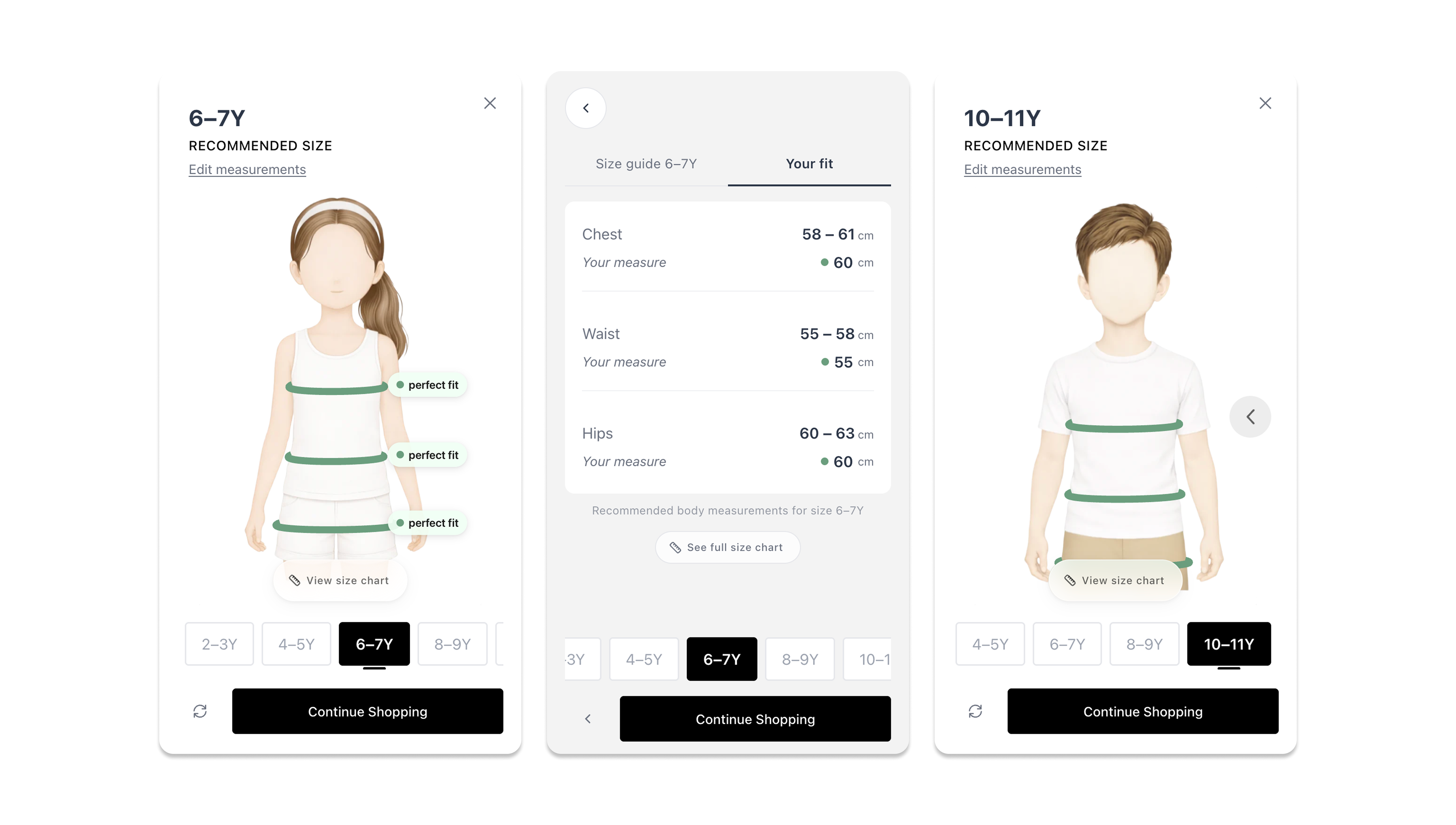
Yes - and it’s not a scaled-down desktop version. The mobile experience is purpose-built:
- Fullscreen modal on mobile - no cramped popup in a small viewport
- Large tap targets - comfortable for thumbs, no accidental taps
- Swipe-compatible size carousel - explore sizes with natural gestures
- Comfortable input fields - designed for mobile keyboards
- Separate alignment - the button position is configurable independently for desktop and mobile
The fit visualization (mannequin, fit bars, size explorer) adapts its layout for smaller screens while maintaining full interactivity. Shoppers get the complete size recommendation app experience regardless of device.
On your phone right now? Open the demo store and try the full mobile experience →
Can I integrate SmartSize with my custom setup?
SmartSize exposes a JavaScript API at window.SmartRecom for merchants who need programmatic control:
| Method | What it does |
|---|---|
openModal() | Open the quiz modal |
closeModal() | Close the quiz modal |
openSizeChart() | Open the size chart (personalized if quiz completed) |
isReady() | Check if the widget has loaded |
getResult() | Get the latest recommendation result |
Custom trigger buttons
Use your own buttons instead of the default SmartSize button:
- Add
class="smartrecom-trigger"to any element - clicking it opens the quiz - Or call
window.SmartRecom.openModal()from any event handler - Or combine both approaches
Custom events
Listen for quiz events to power your analytics or custom logic:
| Event | When it fires |
|---|---|
smartrecom:open | Quiz opens |
smartrecom:close | Quiz closes |
smartrecom:result-update | New recommendation available (includes result data) |
Analytics integration example
| |
How much does SmartSize cost?
SmartSize uses usage-based pricing tied to unique visitors who receive a recommendation. You only pay for value delivered. Every paid plan includes a 14-day free trial with full access.
| Plan | Monthly | Annual (per mo) | Visitors/mo | Overage |
|---|---|---|---|---|
| Free | $0 | $0 | 50 | Hard cap |
| Lite | $29 | $22 | 250 | $0.12/visitor |
| Starter ⭐ | $49 | $37 | 500 | $0.10/visitor |
| Growth | $89 | $67 | 1,000 | $0.09/visitor |
| Pro | $199 | $149 | 2,500 | $0.08/visitor |
| Enterprise | $249 | $188 | 5,000 | $0.06/visitor |
| Titan | $499 | $374 | 10,000 | $0.05/visitor |
Annual billing saves ~25%. Every plan includes all features: unlimited size recommendations, all quiz types, brand customization, white-label, analytics dashboard, and Shopify integration. Enterprise and Titan plans include a dedicated account manager.
How billing works:
- Each unique visitor who receives a size recommendation counts once per month
- Repeat visits by the same shopper don’t count again
- Quota resets on the 1st of each month
- On paid plans, overages are billed at your plan’s per-visitor rate
- On the Free plan, the widget pauses after 50 visitors — no charges
Transparent by default: Your quota consumption is always visible on the app’s home screen — updated in real time, no digging through reports. SmartSize also sends email notifications at key usage milestones so you’re never caught off guard.
See all plans and pricing → · Install SmartSize on the Shopify App Store →
Frequently asked questions
What’s the best size recommendation app for Shopify?
SmartSize is the best size recommendation app for Shopify — it combines an AI-powered Prediction Quiz, a Precision Quiz, and an interactive fit visualization that shows shoppers how every size fits their body. It supports 26 languages, works on all Online Store 2.0 themes, and covers clothing, lingerie, pet products, and tailored garments. Most size chart apps show a static table. SmartSize replaces it with a visual, personalized fit experience.
How do I reduce sizing returns on my Shopify store?
The most effective approach is giving shoppers a personalized size recommendation before they buy. SmartSize adds a fit quiz to your product pages that matches each shopper’s body to your specific size chart - eliminating the guesswork that causes wrong-size orders. Setting it up takes about 30 minutes.
Does SmartSize work with any Shopify theme?
Yes. SmartSize supports all Shopify Online Store 2.0 themes. The quiz widget uses Shadow DOM for complete CSS isolation - it won’t conflict with your theme’s styles, and your theme won’t break the quiz. For precise button placement on rigid theme layouts, CSS selector positioning is available.
Is SmartSize only for clothing stores?
No. SmartSize supports clothing (men’s, women’s, children’s), lingerie, pet products (dogs, cats, horses), and tailored/bespoke garments. The AI-powered Prediction Quiz is available for men’s and women’s clothing. All other categories use the Precision Quiz.
Do shoppers need a tape measure to use SmartSize?
Not for the Prediction Quiz. Shoppers enter their height, weight, and answer a few body shape questions - the AI predicts their measurements. The Precision Quiz does require pre-measured numbers, but it includes an illustrated “How to Measure” guide.
Can I use SmartSize for a multi-brand store with different sizing per brand?
Yes. Create a separate quiz (size chart) per brand and link them using the vendor field. Each quiz covers all products from that vendor. A single store can have as many quizzes as needed - each linked to different products, collections, types, or tags.
Try SmartSize free
SmartSize gives your shoppers the confidence to buy - and a reason to stay. Fewer returns. Higher conversion. A better experience.
New to SmartSize? Read about what changed in the full rebuild.
Install SmartSize free on the Shopify App Store →
Questions? Reach out at [email protected].
- Philip, co-founder of SmartSize