Most Shopify stores measure affiliate marketing with a familiar set of numbers: clicks, conversions, revenue, and commissions.
These numbers tell you which partners perform. But they do not always tell you who is buying.
That is where audience data becomes useful.
When you understand the shoppers behind the conversions — their age groups, sizes, body shapes, and fit needs — you can make better decisions about which affiliates to recruit, how to brief them, and how to improve the experience after their audience reaches your store.
Here is how the two layers of affiliate marketing analytics work together.
What is affiliate marketing analytics?
Affiliate marketing analytics is the data merchants use to measure and improve their affiliate program.
It typically includes:
- Affiliate clicks and referrals
- Conversions and sales
- Commission costs
- Revenue and ROI
- Performance by affiliate
Platforms such as UpPromote track this program-level data through affiliate links, coupon codes, and connected customers, helping merchants see which partners are generating results.
But there is another useful layer of data: the shoppers behind those results.
A report might show that one affiliate converts more visitors than another. It will not necessarily tell you whether those shoppers tend to be younger or older, which sizes they need, or which body profiles are most common.
That information can help merchants understand why certain audiences may be a better fit for their brand.
Which analytics does an affiliate program need?
There are two useful layers of data, and they answer different questions:
| Program analytics | Audience analytics | |
|---|---|---|
| Question it answers | Which partners perform? | Who are my shoppers? |
| Typical data | Clicks, conversions, commissions, revenue, ROI | Age groups, sizes, body shapes, fit profiles |
| Where it comes from | Affiliate platforms such as UpPromote | First-party shopper interactions |
| What it helps improve | Partner performance, commissions, program decisions | Recruitment, creator briefs, merchandising decisions |
Program analytics help you optimize the affiliates you already work with.
Audience analytics can help inform who you recruit next.
And that decision happens before the first click or commission.
Where does audience data come from?
For apparel stores, sizing interactions can provide useful first-party customer insights.
When shoppers use the SmartSize fit quiz, they answer a few questions — such as height, weight, age, and body shape — to receive a size recommendation for a specific product.
Across many completed quizzes, those answers can reveal patterns.
SmartSize Customer Insights helps merchants understand:
- Shopper age distribution
- Height and weight ranges
- Common body shapes
- Fit profiles
- Recommended sizes
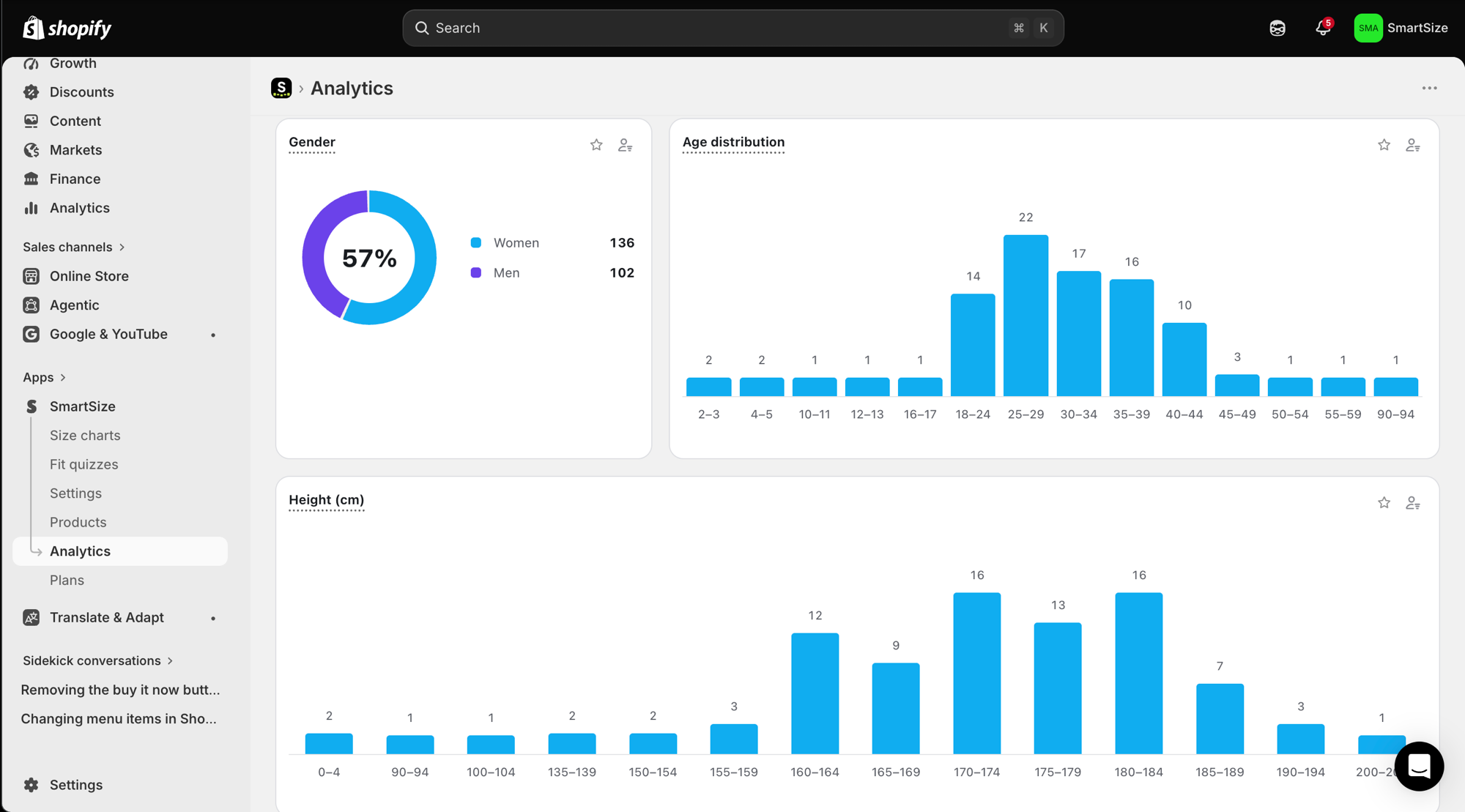
Instead of relying only on assumptions about your audience, you can use information collected through real sizing interactions on your own store.
That creates a clearer picture of the shoppers your affiliates are sending to you.
How can Customer Insights improve affiliate targeting?
Here are four practical ways merchants can use audience insights alongside affiliate performance data.
1. Recruit affiliates whose audiences resemble your customers
Follower count alone does not tell you whether a creator is a good fit for your store.
Suppose your customer data shows that a large share of shoppers are 25–34 and commonly need sizes M–XL. That gives you another signal to consider when evaluating potential affiliates.
Instead of asking only:
How large is this creator’s audience?
You can also ask:
Does this creator appear to reach the type of shopper who already buys from us?
2. Give creators better briefs
Audience insights can also make affiliate content more relevant.
If you understand the sizes, fit needs, or body profiles common among your shoppers, you can give creators more useful information about the customers your products serve.
That can lead to more specific content about fit, sizing, and product suitability instead of relying only on generic discount messages.
3. Spot gaps in your size range
Sizing data can reveal demand near the edges of your current size range.
If many shoppers appear to need sizes at or beyond those limits, that may be useful information for both merchandising and affiliate recruitment.
For example, it could support a decision to work with creators whose audiences care strongly about inclusive sizing.
4. Give affiliate traffic more sizing confidence
Affiliate traffic often introduces new shoppers to a brand.
For apparel stores, one of the questions those shoppers may have is simple:
Which size should I buy?
A fit quiz can answer that question directly on the product page.
That gives shoppers more information before purchasing and helps merchants turn affiliate traffic into a more informed shopping experience.
Why are SmartSize and UpPromote partnering?
UpPromote helps Shopify merchants run affiliate and influencer programs.
It is Built for Shopify, rated 4.9★ from more than 3,600 reviews, and used by more than 250,000 brands. Merchants can use UpPromote to recruit partners, track referrals through links and coupon codes, manage commissions, and automate parts of their affiliate program.
SmartSize works alongside UpPromote from a different part of the customer journey.
UpPromote helps you understand which affiliates drive results.
SmartSize helps you understand the sizing needs of the shoppers arriving at your store.
There is no integration or shared data required between the two apps. Merchants can simply use the insights from both dashboards to make better-informed decisions.
For example:
- UpPromote: Which creator generated the most conversions?
- SmartSize: What do the shoppers interacting with our sizing experience look like?
Together, those two perspectives can give merchants a more complete view of affiliate performance and customer fit.
How do I start using audience analytics?
1. Add a fit quiz to your product pages
Shoppers tap Find my size, answer a few questions, and receive a size recommendation for that product.
Setup takes only a few minutes and does not require code.
2. Let your customer insights build
As shoppers complete the fit quiz, SmartSize starts building a clearer picture of your sizing audience.
Your Customer Insights update as new data comes in.
3. Review your audience before recruiting new affiliates
Look at the age groups, sizes, body shapes, and fit profiles appearing in your store.
Then use those insights as an additional signal when evaluating potential creators and affiliates.
(If you’re still mapping out which partner types to pursue in the first place, UpPromote’s free Find-Perfect-Partner tool matches your store to its best-fit partner profiles in about 30 seconds, a useful starting point before you layer your audience data on top.)
4. Give affiliates more useful information
Share relevant sizing and fit insights when briefing partners.
The better an affiliate understands the customers your products serve, the easier it is to create useful and specific content.
Your affiliate platform tells you who sends the shoppers.
Your customer insights can help you understand who those shoppers are.
Use both, and your next affiliate decision can be based on more than clicks alone.
→ Try SmartSize — size charts, fit quiz, and Customer Insights for your Shopify store. Rated 5.0★ and trusted by 5,000+ stores.
→ Try UpPromote — affiliate, influencer, and referral marketing for your Shopify store. Rated 4.9★ and trusted by 250,000+ brands.