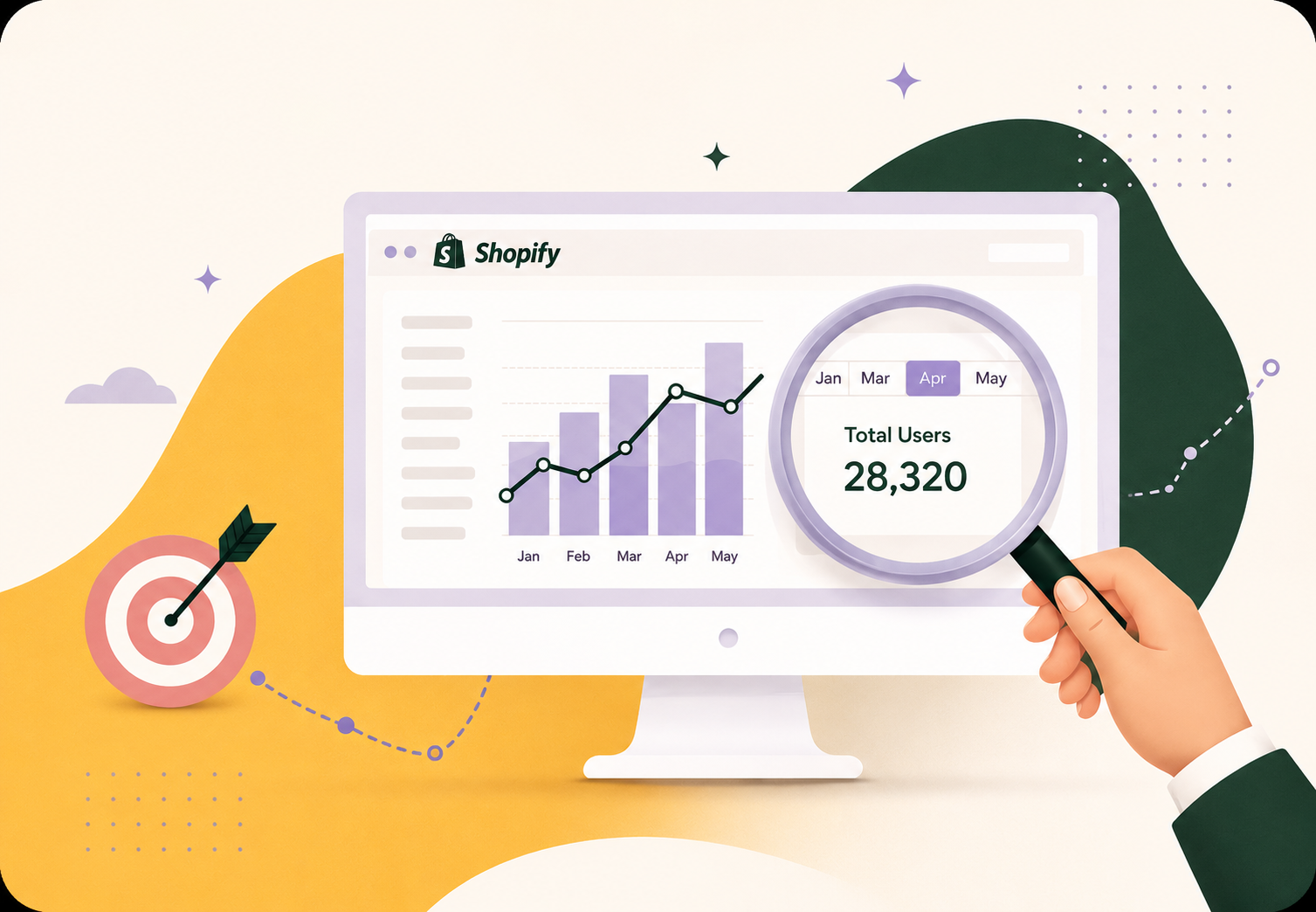
You can find your unique monthly visitors in Shopify Admin → Analytics → Reports → “Visitors over time”. If your plan does not include that report, use an analytics tool like Google Analytics, or estimate the number from your order count. This guide explains all three options.
What is a unique visitor?
A unique visitor is one person (one device) counted once in a given month. If the same shopper visits your store 5 times, that is 1 unique visitor, not 5.
| Metric | What it counts |
|---|---|
| Unique visitors | Individual people — each person counted once |
| Sessions | Every visit, including repeat visits |
| Page views | Every page load across all visits |
Unique visitors are usually 50–70% of your session count. The two metrics are not the same, so do not mix them up.
Option A: Use Shopify Analytics (Basic plan and above)
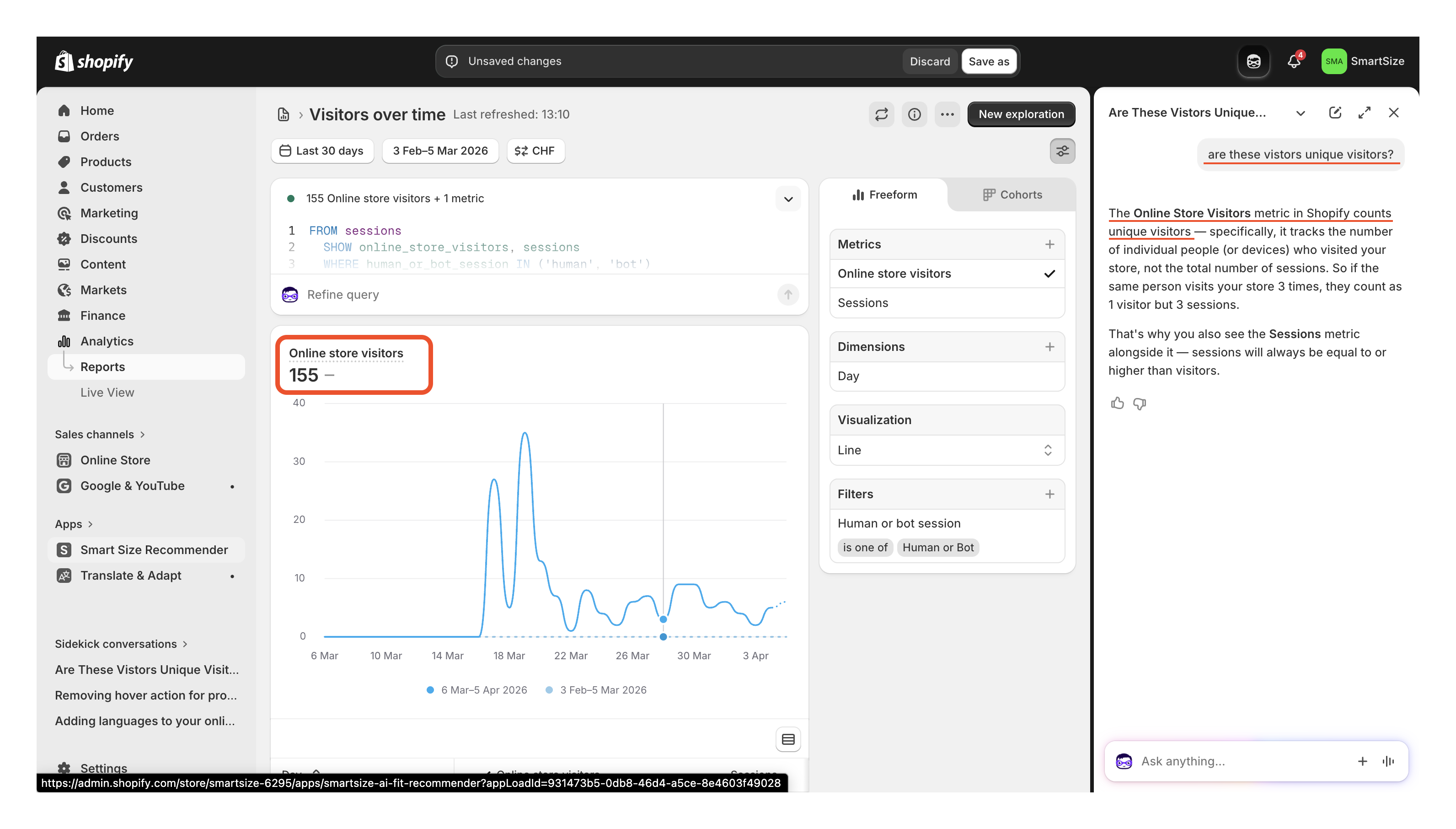
The fastest way is the “Visitors over time” report in your Shopify admin:
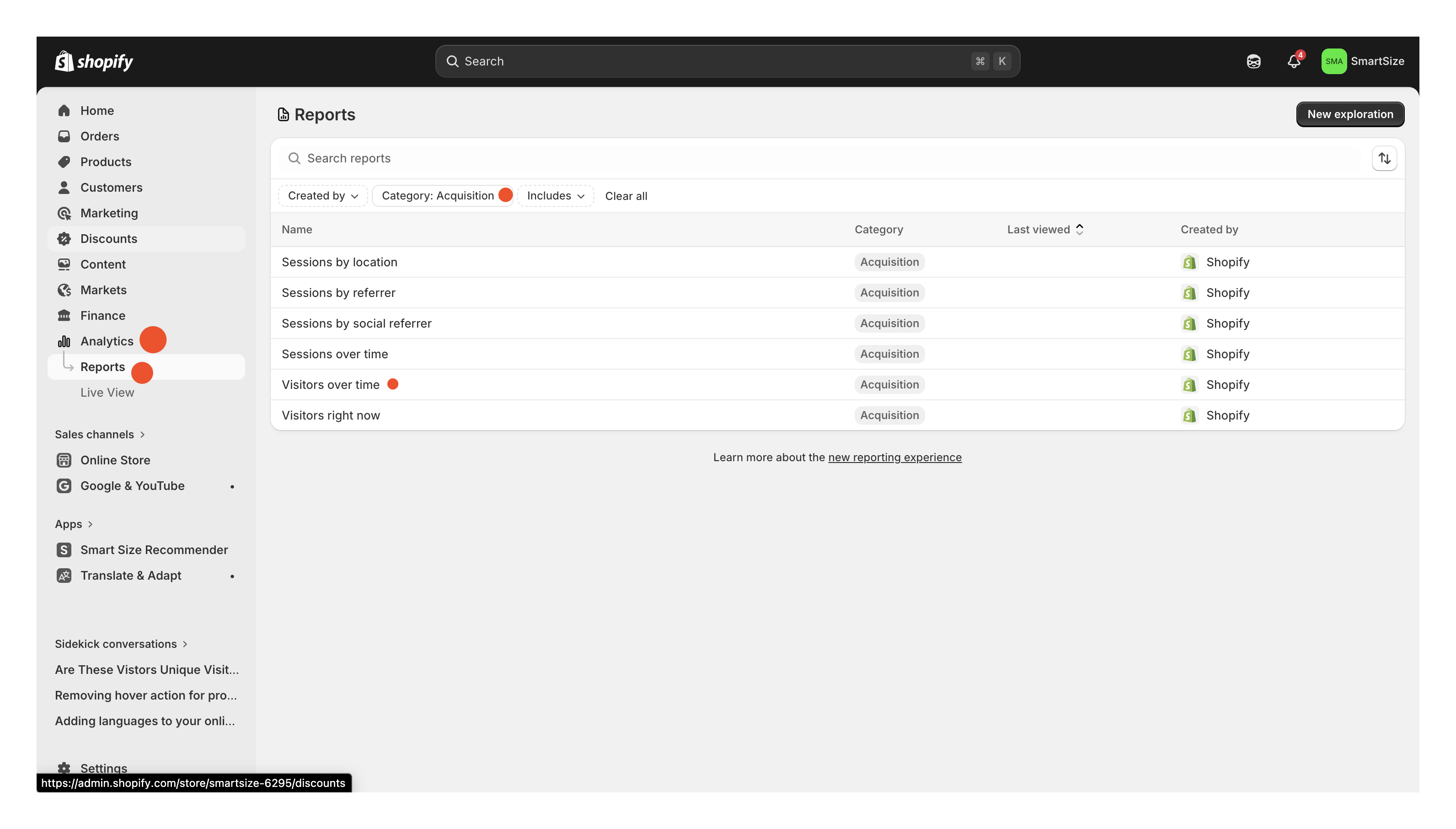
- Go to Shopify Admin → Analytics → Reports
- Filter by Category → Acquisition and open “Visitors over time”
- Set the date range to Last 30 days
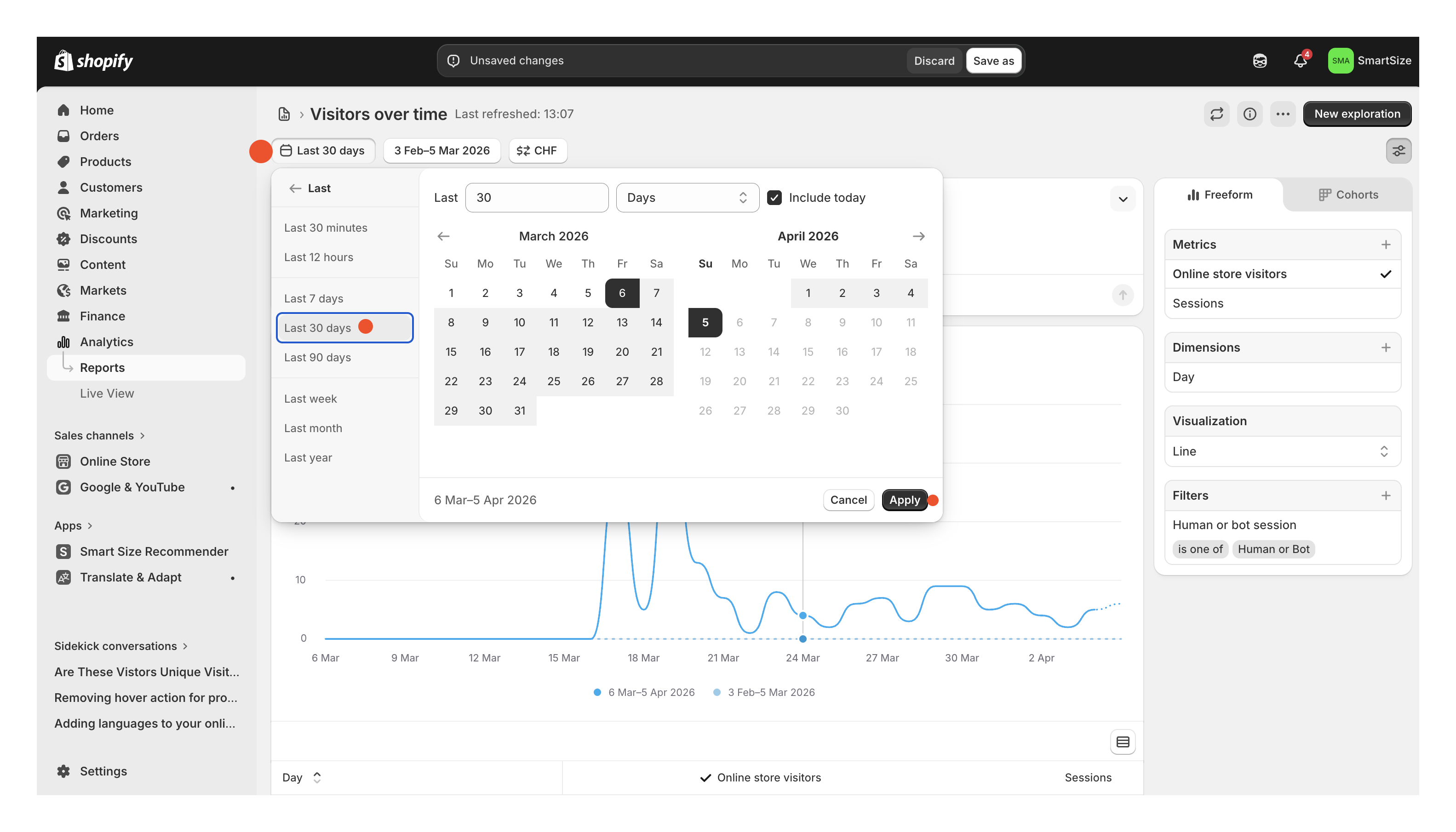
- Read the “Online store visitors” total. That number is your unique visitor count.
This report is not available on the Starter plan. If you are on Starter, use Option B or Option C instead.
Option B: Use an analytics tool
If you already use an analytics tool, unique visitors is usually the main number on the dashboard:
| Tool | Where to look | Free? |
|---|---|---|
| Google Analytics (GA4) | Reports → Acquisition → “Users” | ✅ Free |
| Plausible | Dashboard → “Unique visitors” (top of page) | 30-day trial |
| Fathom | Dashboard → “Unique visitors” | From $14/mo |
| Mixpanel | Insights → “Unique Users” | Free tier |
| Clicky | Dashboard → “Unique visitors” | Free tier |
| Matomo | Dashboard → “Unique visitors” widget | Self-hosted free |
GA4 tip: Use the “Users” metric, not “Sessions” or “New users.” If you have not set up GA4 yet: create a free account at analytics.google.com, copy your Measurement ID (it starts with
G-), paste it in Shopify Admin → Online Store → Preferences, and save. Data appears within 24–48 hours.
Option C: Estimate unique visitors from your order count
If you have no analytics data, use this standard e-commerce formula:
Unique visitors ≈ Monthly orders ÷ Conversion rate
The average Shopify conversion rate is 1.4–1.8%, according to Littledata’s benchmark of thousands of Shopify stores. Using 2% as a round midpoint gives a conservative estimate:
| Monthly orders | Est. unique visitors |
|---|---|
| 10 | ~500 |
| 25 | ~1,250 |
| 50 | ~2,500 |
| 100 | ~5,000 |
| 250 | ~12,500 |
| 500 | ~25,000 |
| 1,000 | ~50,000 |
Find your order count in Shopify Admin → Analytics → Overview → Total orders (last 30 days).
This method gives a rough estimate based on industry benchmarks. For exact numbers, use Option A or Option B.
Frequently asked questions
How do I check my unique visitors on Shopify?
Go to Analytics → Reports → Visitors over time and set the range to Last 30 days. This report is available on Shopify Basic and above. On the Starter plan, use Google Analytics or another analytics tool.
What is the difference between sessions and unique visitors?
Sessions count every visit. Unique visitors count individual people. One shopper who visits 5 times creates 5 sessions but 1 unique visitor. Unique visitors are usually 50–70% of sessions.
Can I estimate unique visitors from my order count?
Yes. Divide your monthly orders by 0.02. For example, a store with 100 orders has roughly 5,000 unique visitors. This is based on Littledata’s Shopify conversion rate benchmark of 1.4–1.8%.
Which Shopify plans include the “Visitors over time” report?
Basic, Shopify, Advanced, and Plus. The Starter plan does not include it.
Why this matters for SmartSize pricing
SmartSize does not bill by your unique visitors. Your visitor count is useful context, but our Pro plans are sized by monthly quiz users — the distinct shoppers who complete the AI size quiz in a calendar month. That is usually a small fraction of your total visitors, because most people who browse never open the quiz. Your size charts and the rest of your store traffic are always free and unlimited. Transparency is a core value for us, so we show you every monthly count since the day you installed SmartSize right on your app home page. You always see the exact numbers.
How we count: each shopper is counted once per calendar month, the first time they complete the quiz. It does not matter how many times they visit or how many products they check. A returning customer who gets sized on 10 products in one month still counts as 1 monthly quiz user. Every quiz user gets unlimited repeat recommendations across products for the entire month.
One shopper, one count, unlimited repeat recommendations.
| Plan | Monthly quiz users | Monthly | Annual (per mo, save 20%) |
|---|---|---|---|
| Free / Starter / Growth | — (size charts only) | $0 / $9 / $12 | — / $7.20 / $9.60 |
| Pro 100 ★ | 100 | $19 | $15.20 |
| Pro 250 | 250 | $29 | $23.20 |
| Pro 500 | 500 | $49 | $39.20 |
| Pro 1K | 1,000 | $89 | $71.20 |
| Pro 2.5K | 2,500 | $199 | $159.20 |
| Pro 5K | 5,000 | $249 | $199.20 |
| Pro 10K | 10,000 | $499 | $399.20 |
Pro 100 is the entry-level tier on the Shopify App Store. Pro 250 and above are sold on smartsize.io, and we show them in the app when a Pro 100 merchant approaches their cap. No overage charges on any tier — pricing is a flat monthly amount, and annual billing saves 20% on every paid plan.
Not sure which plan fits your store? Start with the Free plan for size charts, then upgrade to Pro when you want to add the AI size quiz.
→ Try the AI size quiz live on our demo store
SmartSize is Built for Shopify — Shopify’s top-tier quality badge for apps that meet the highest bar on performance, admin integration, and merchant experience. You can install it directly from the App Store in a couple of clicks.
 Try SmartSize for free
Questions? Reach out at [email protected].
— Philip, co-founder of SmartSize