SmartSize is an AI size recommender for Shopify. Shoppers answer a short quiz. SmartSize then shows them which size fits their body, with a visual and interactive result. This guide explains every feature, how setup works, and what it costs.
Why does this matter? Shoppers cannot try clothes on online. Size charts are hard to read, and sizing differs between brands. Unsure shoppers leave without buying. Shoppers who guess often pick the wrong size and return the item. According to Barclaycard, wrong-size returns account for 30-40% of all online apparel returns.
A size recommender solves both problems. It helps unsure shoppers buy with confidence, and it helps buyers pick the right size the first time.
This guide is for merchants who are comparing fit finder apps, and for merchants who already use one and want to use it better.
In this guide:
- What is a size recommendation app?
- How the fit quiz works for shoppers
- How SmartSize shows which size fits best
- Returning shoppers
- How SmartSize reduces sizing returns
- Supported product categories
- AI size chart extraction
- Merchant setup
- Customization options
- Supported languages
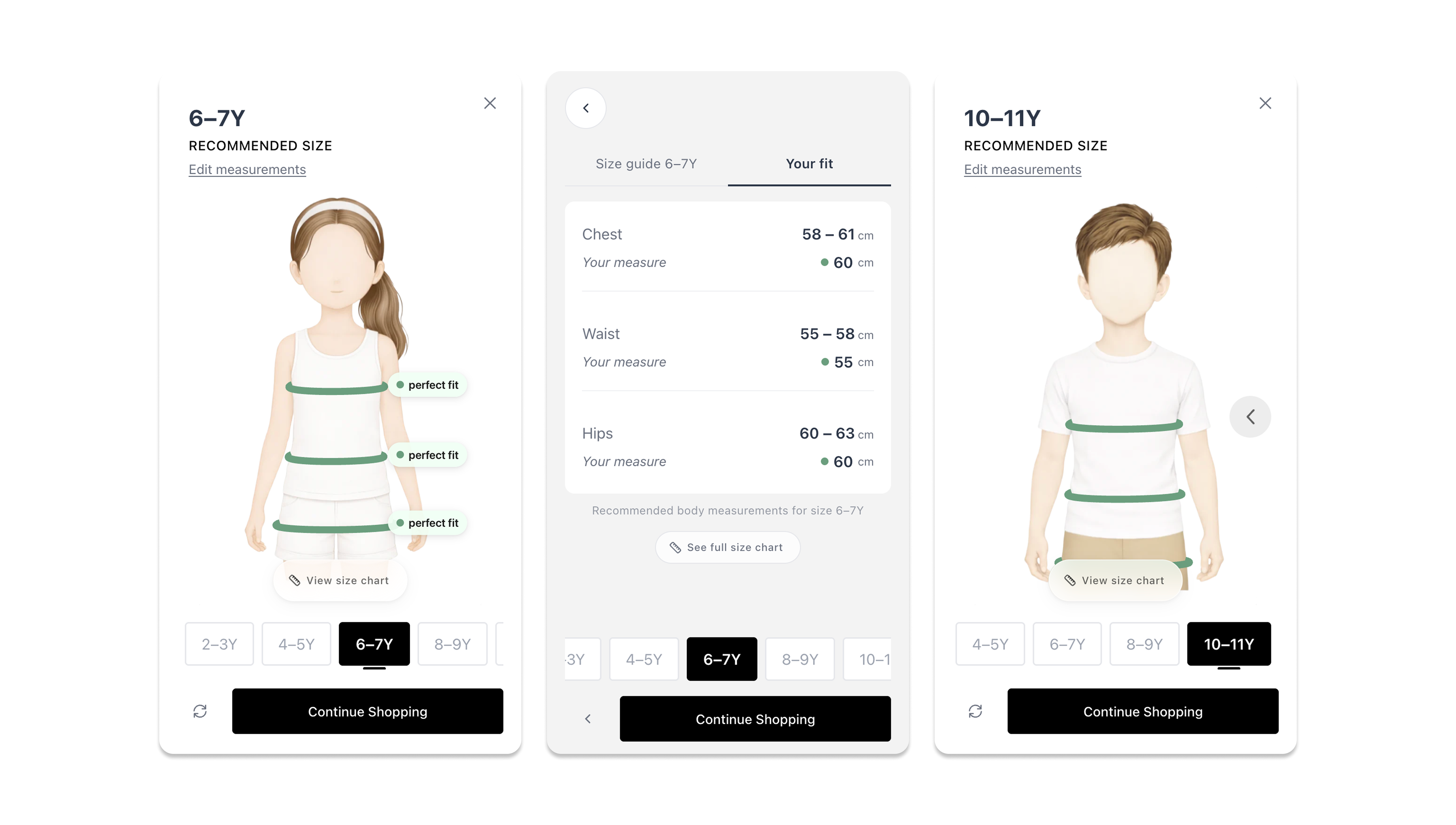
- Mobile experience
- JavaScript API & integrations
- Pricing
- FAQ
What is a size recommendation app - and why does your store need one?
A size recommendation app helps online shoppers find the right size before they buy. The shopper does not need to read a static size chart. Instead, they answer a few questions and receive a personalized size recommendation for the exact product they are viewing.
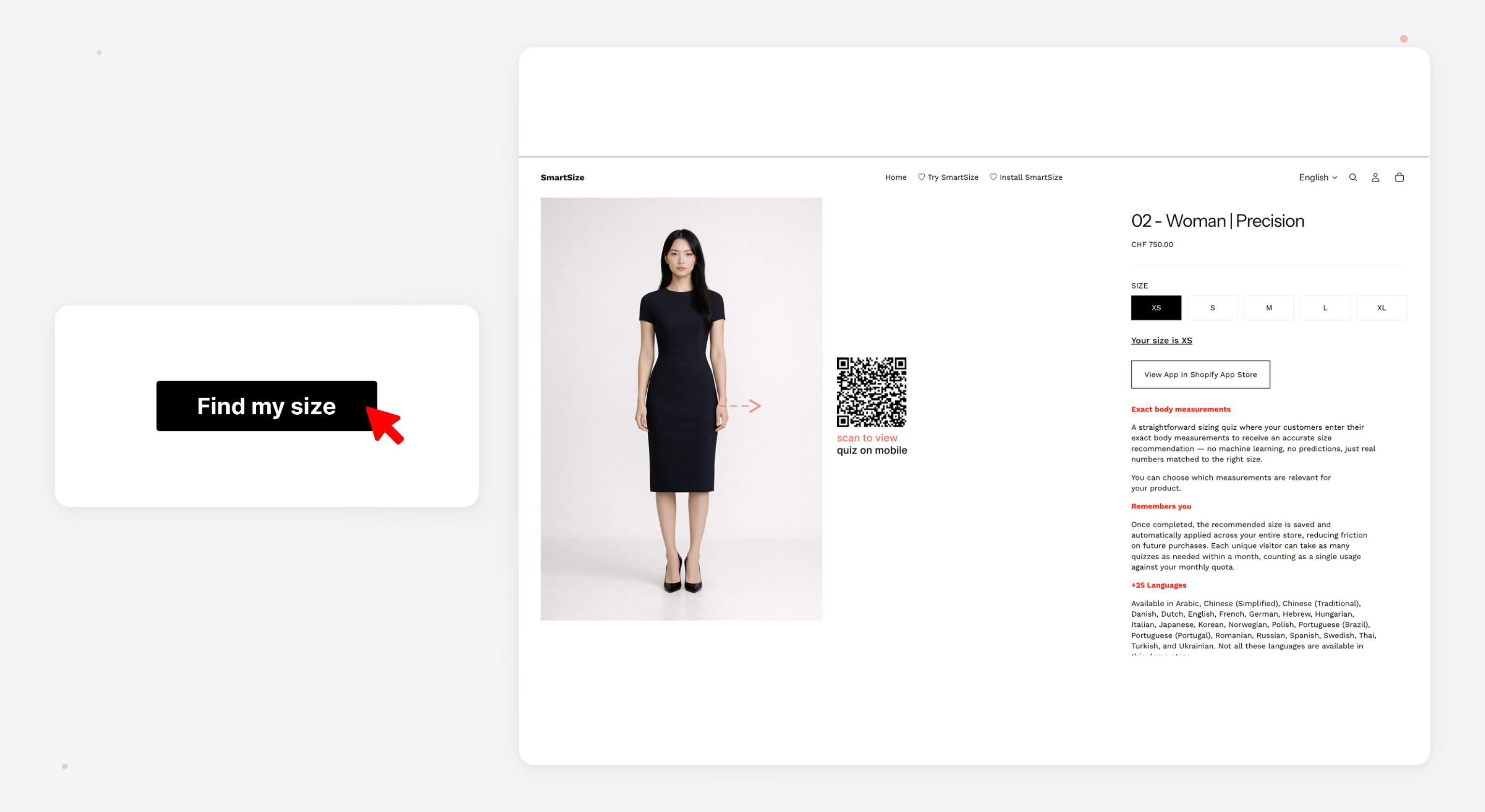
SmartSize is an AI size recommender built for Shopify. It adds a “Find My Size” button to product pages. The shopper taps the button and answers a short quiz (30-60 seconds). They then see a visual, interactive result. It is not only a size label — it shows how their body fits in each available size.
Why this matters for your store:
- Fewer returns - shoppers order the right size the first time
- Higher conversion - confident shoppers are more likely to buy
- Less support work - fewer “what size should I get?” emails
- Better experience - the quiz feels premium and builds trust in your brand
SmartSize is not a basic size chart app. It is a fit recommender that gives your customers a memorable experience.
How does SmartSize’s fit quiz work for shoppers?
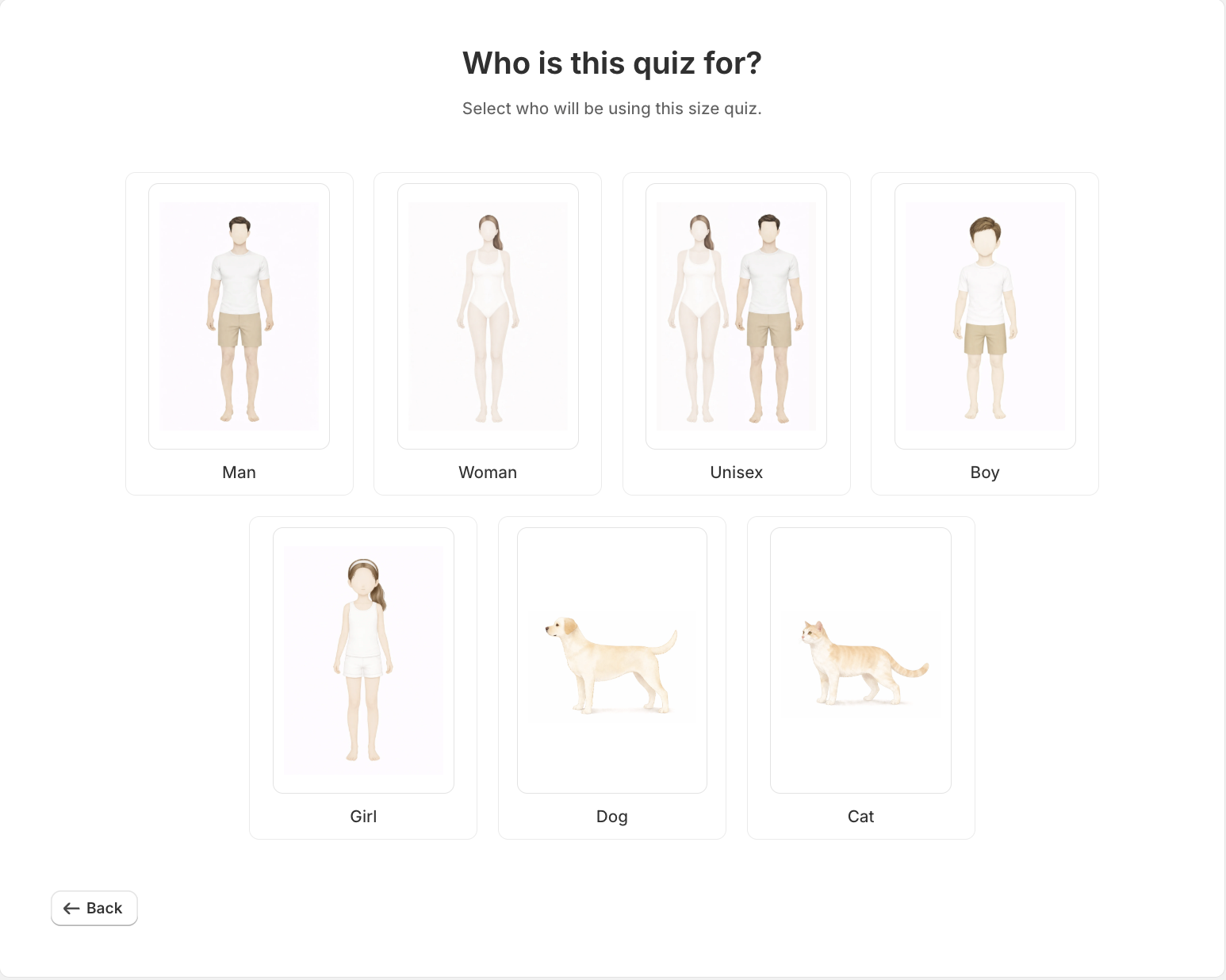
The shopper journey starts with a “Find My Size” button on the product page. Tapping it opens a clean popup window. The shopper completes a few quick steps and receives a personalized recommendation with an interactive visualization.
SmartSize offers two quiz types, plus a combined mode:
The Prediction Quiz (AI-Powered)
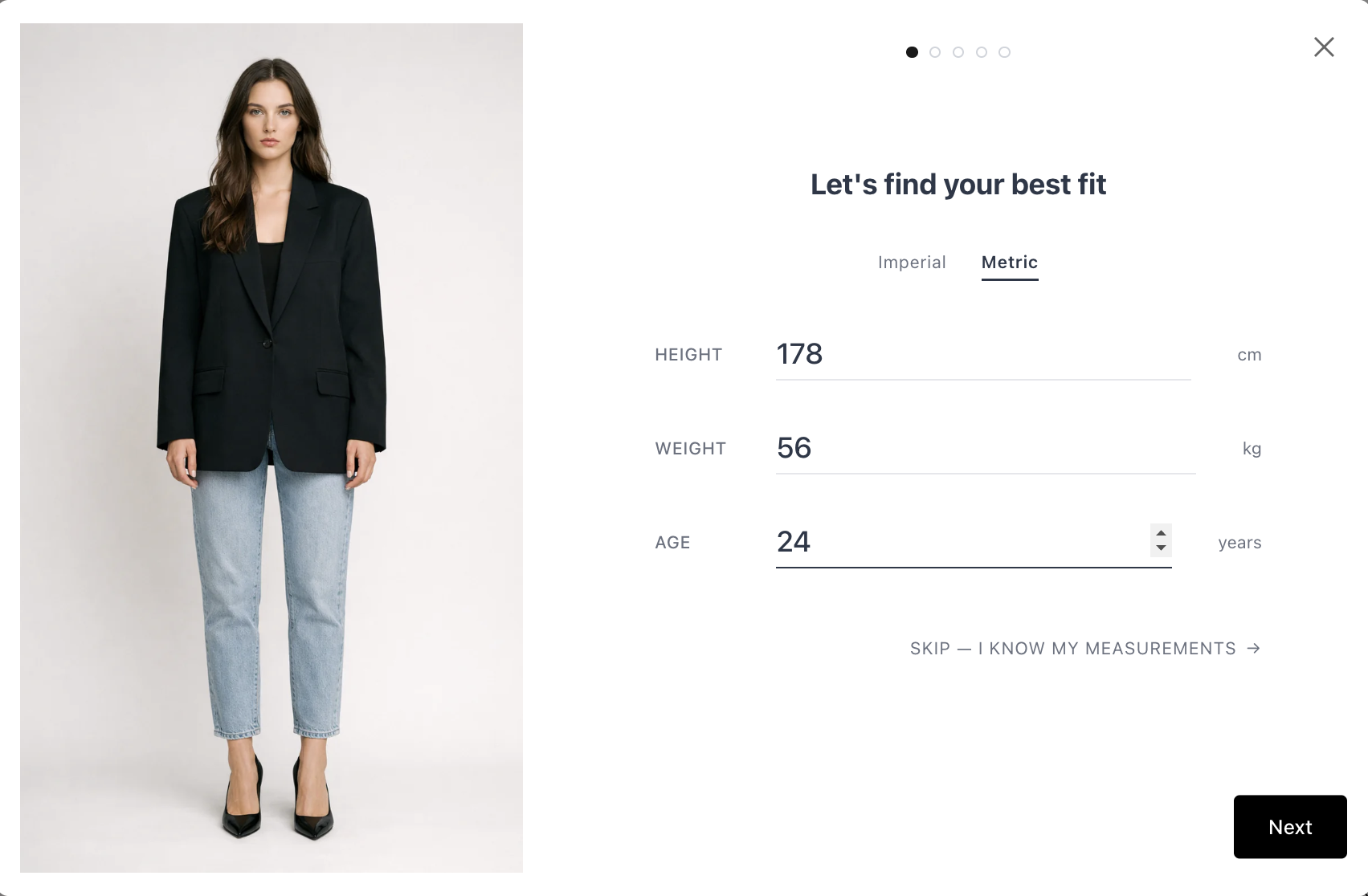
The shopper enters their height and weight. They then answer 3-4 visual body shape questions by tapping illustrated cards that match their build. A machine learning model predicts their body measurements and compares them with the product’s size chart.
For women (4 questions): weight distribution, waistline shape, belly shape, and optional bra size. For men (3 questions): shoulder/torso width, belly shape, buttocks shape.
This is the fastest option. The shopper does not need a tape measure or any known measurements. It is a body measurement quiz powered by AI, and it takes about 30 seconds.
The Precision Quiz
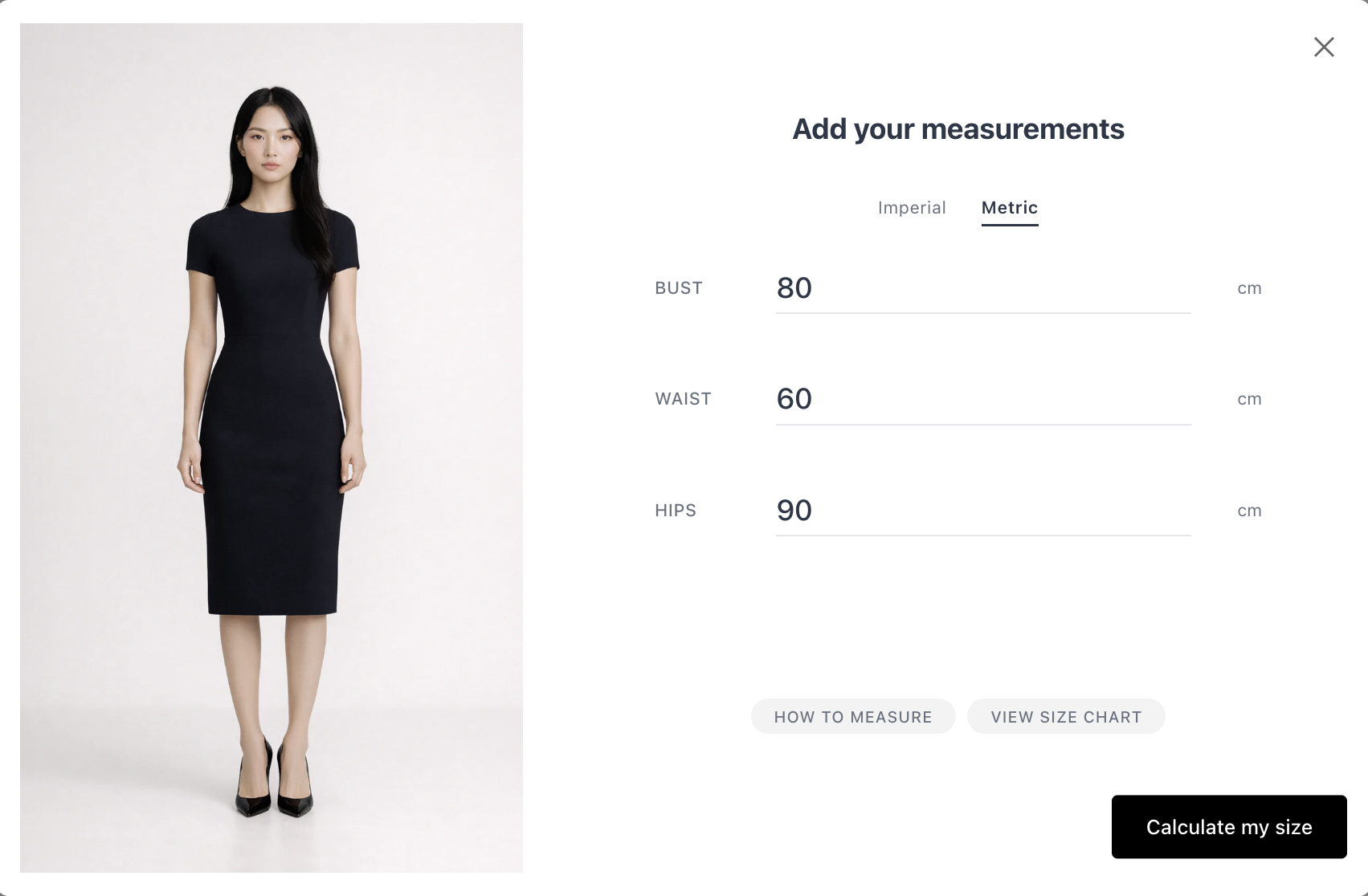
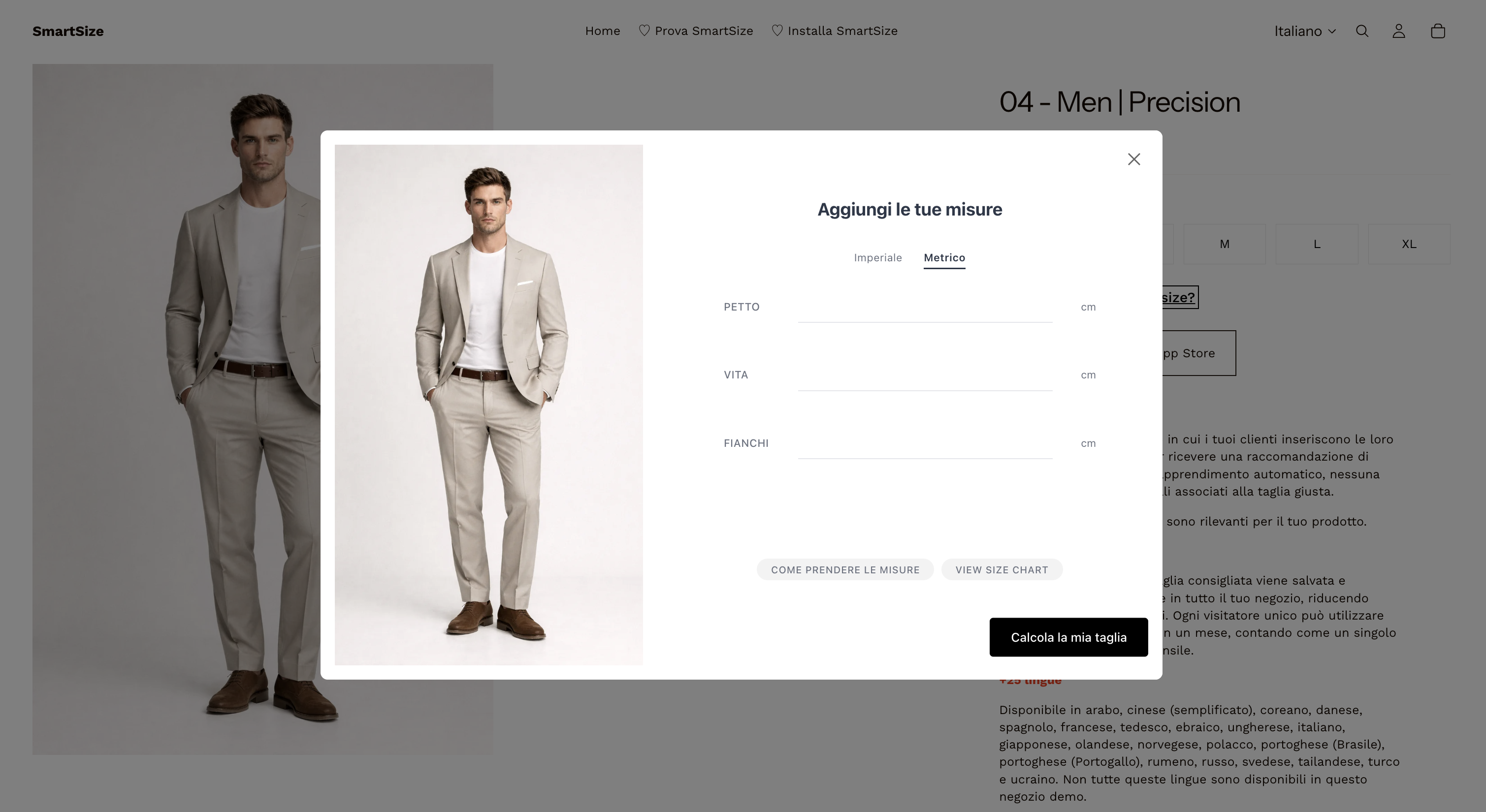
The shopper enters their actual body measurements (chest, waist, hips, inseam, and so on). SmartSize matches these exact numbers against the size chart. This quiz is best for shoppers who already know their measurements.
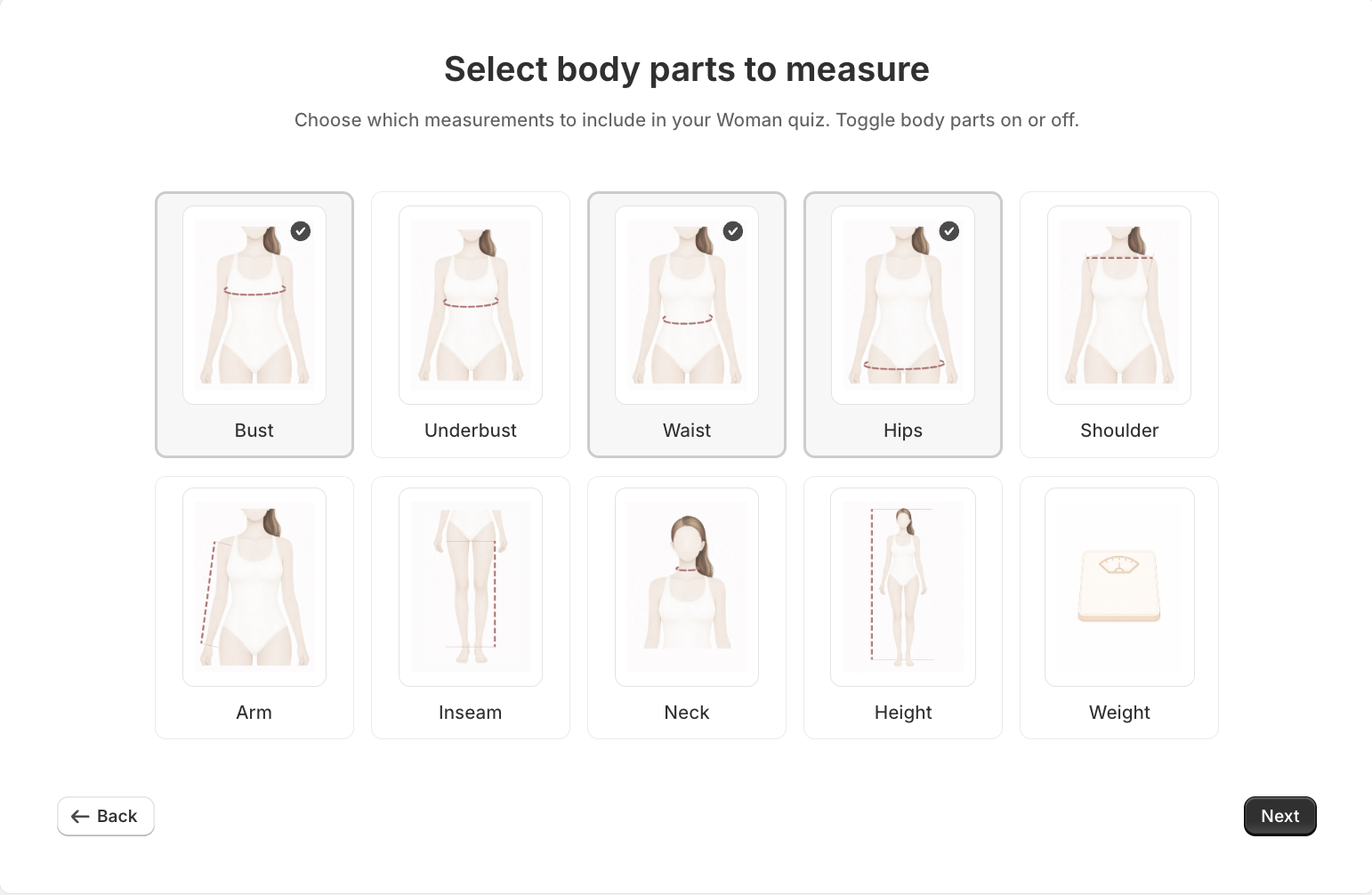
Available measurements include: chest/bust, waist, hips, inseam, neck, arm length, and height. The merchant decides which measurements each quiz requires.
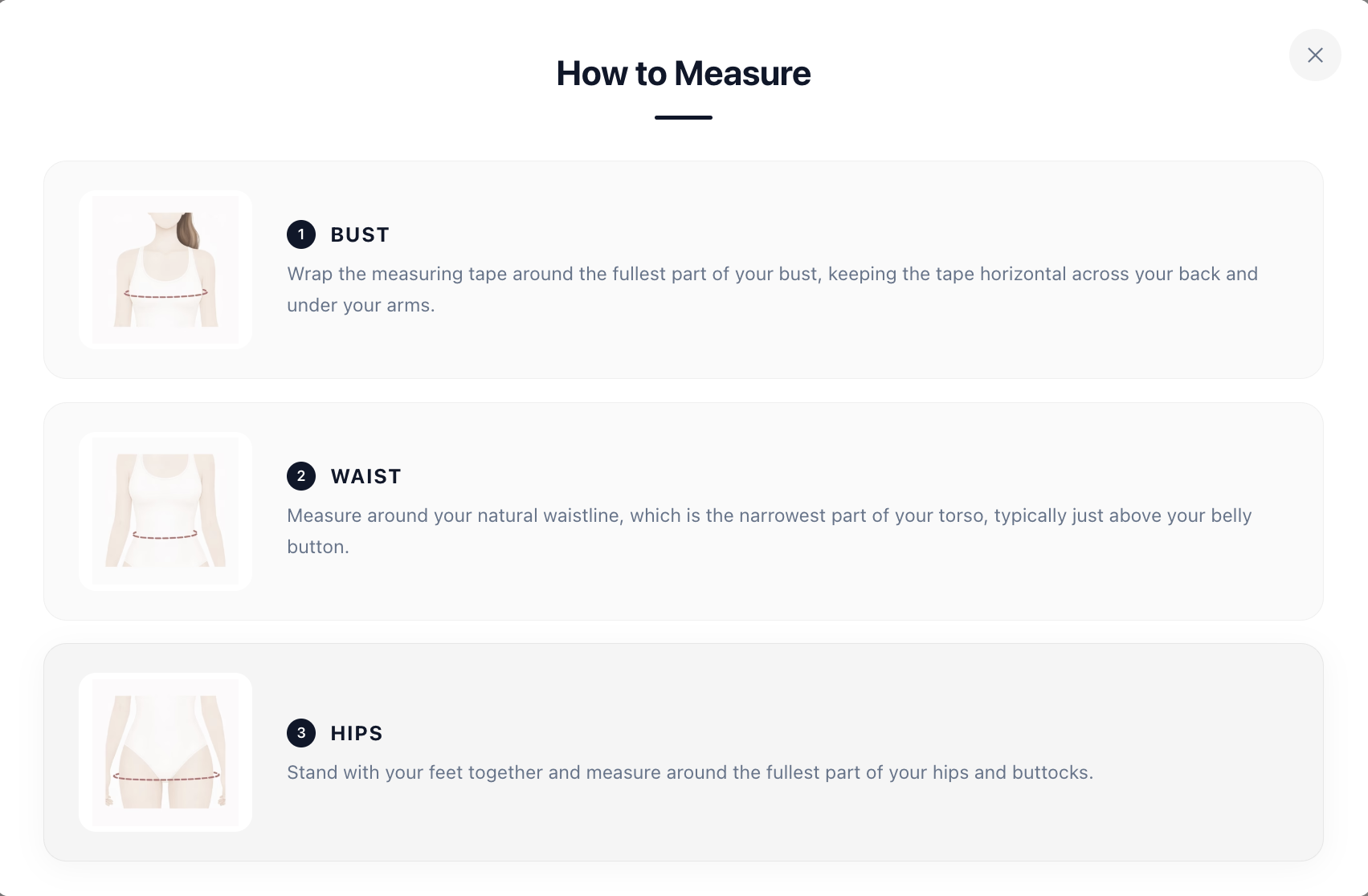
A built-in “How to Measure” guide helps shoppers who need instructions. It is fully translated and includes illustrations.
Combined Mode (Both)
Merchants can enable both quiz types. The shopper starts with the Prediction Quiz and can switch to the Precision Quiz at any time (“I know my measurements”).
| Feature | Prediction Quiz | Precision Quiz |
|---|---|---|
| Input | Height, weight, body shape | Actual body measurements |
| Tape measure needed | No | Yes |
| Time to complete | ~30 seconds | ~60 seconds |
| AI model used | Yes (ML prediction) | No (exact matching) |
| Available for | Men’s & women’s clothing | Men’s, women’s, boys’, girls’, lingerie & pets |
Unit options: Shoppers can switch between metric (cm/kg) and imperial (inches/lbs) at any point in the quiz. The default unit follows the store’s locale.
Want to see the quiz yourself? Try it on our live demo store →
How does SmartSize show shoppers which size fits best?
This is the main difference between SmartSize and other size chart apps or fit finders. After the quiz, the shopper does not only see a size label. They see a full interactive fit visualization. It starts with something every merchant already has: the size chart.
Your size chart - but personalized
Every store has a size chart. SmartSize turns it into a personal tool.
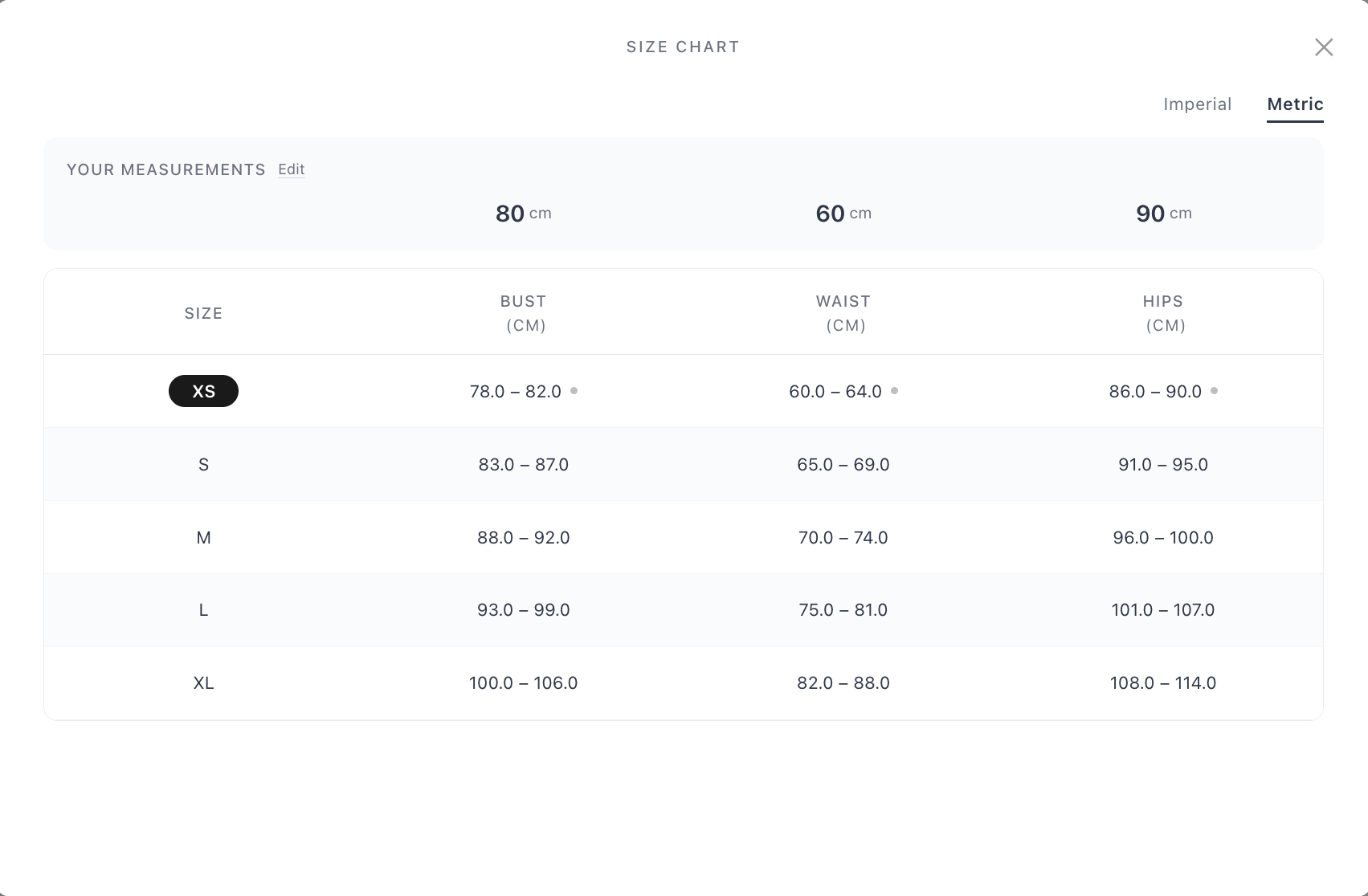
After the quiz, the shopper can open a full size chart view from the recommendation screen. This is not a static table. It is personalized with the shopper’s body data:
- “Your Measurements” panel at the top - it shows the shopper’s own bust, waist, and hip measurements, and the shopper can edit them there
- Min-max ranges for every size (XS through XL and beyond), so the shopper can see exactly where their body falls
- Dot indicators next to measurements where the shopper is close to the edge of a size’s range - a clear visual signal for between-sizes cases
- Recommended size highlighted - the best-fit size is marked in the table
- Imperial / Metric toggle - the shopper can switch units inside the chart
A shopper who completes the Prediction Quiz sees their predicted measurements on the chart. A shopper who completes the Precision Quiz sees their exact numbers. In both cases, a static table becomes a personalized comparison tool.
The size chart is also available before the quiz. It then shows the standard table without personalization. After the quiz, it upgrades automatically.
This matters because many shoppers still prefer a size chart. SmartSize keeps the chart and improves it. For merchants, the same size chart serves two purposes: it powers the recommendation, and it gives confident shoppers a better self-service view.
Mannequin Viewer
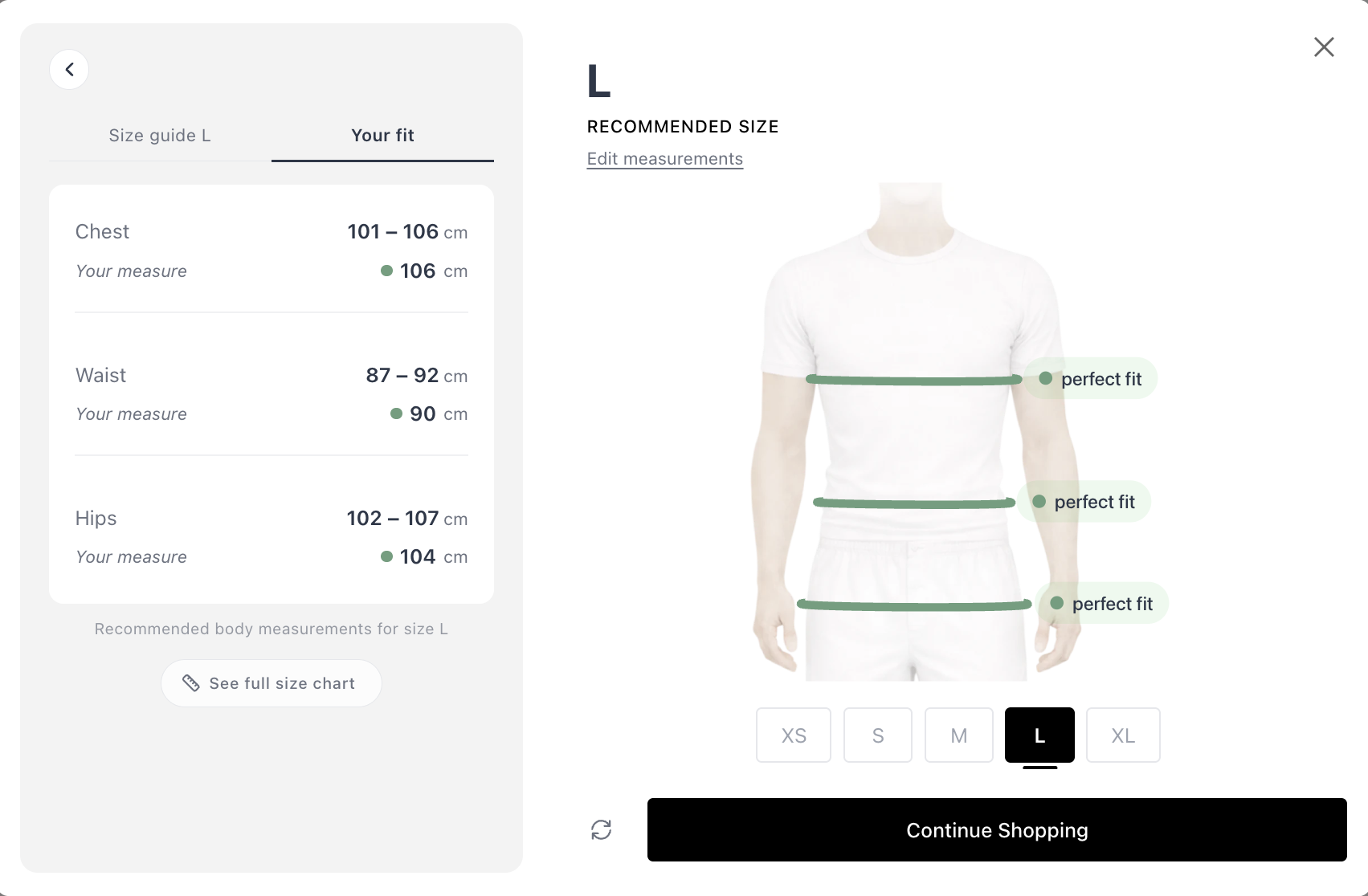
The recommendation screen also includes a body silhouette. It shows how the recommended size fits the shopper’s body, and it updates in real time when the shopper selects a different size. SmartSize works as a virtual fitting room alternative. Shoppers see how each size fits their body without a camera, an app download, or an AR try-on tool.
Fit Bars (Per-Measurement Breakdown)
Color-coded bars for each body measurement (chest, waist, hips, and so on) show how well the shopper’s body fits within the size’s range:
- 🟢 Green - good fit
- 🟡 Amber - snug or loose
- 🔴 Red - too tight or too loose
When the shopper taps a measurement, the matching area is highlighted on the mannequin.
Size Explorer Carousel
A horizontal carousel (XS, S, M, L, XL, and so on) lets the shopper move through every available size. As they browse:
- The mannequin updates
- The fit bars recalculate
- The size chart highlights the selected size
Shoppers can compare all sizes and make an informed decision, instead of trusting a single recommendation without context.
Between-Sizes Handling
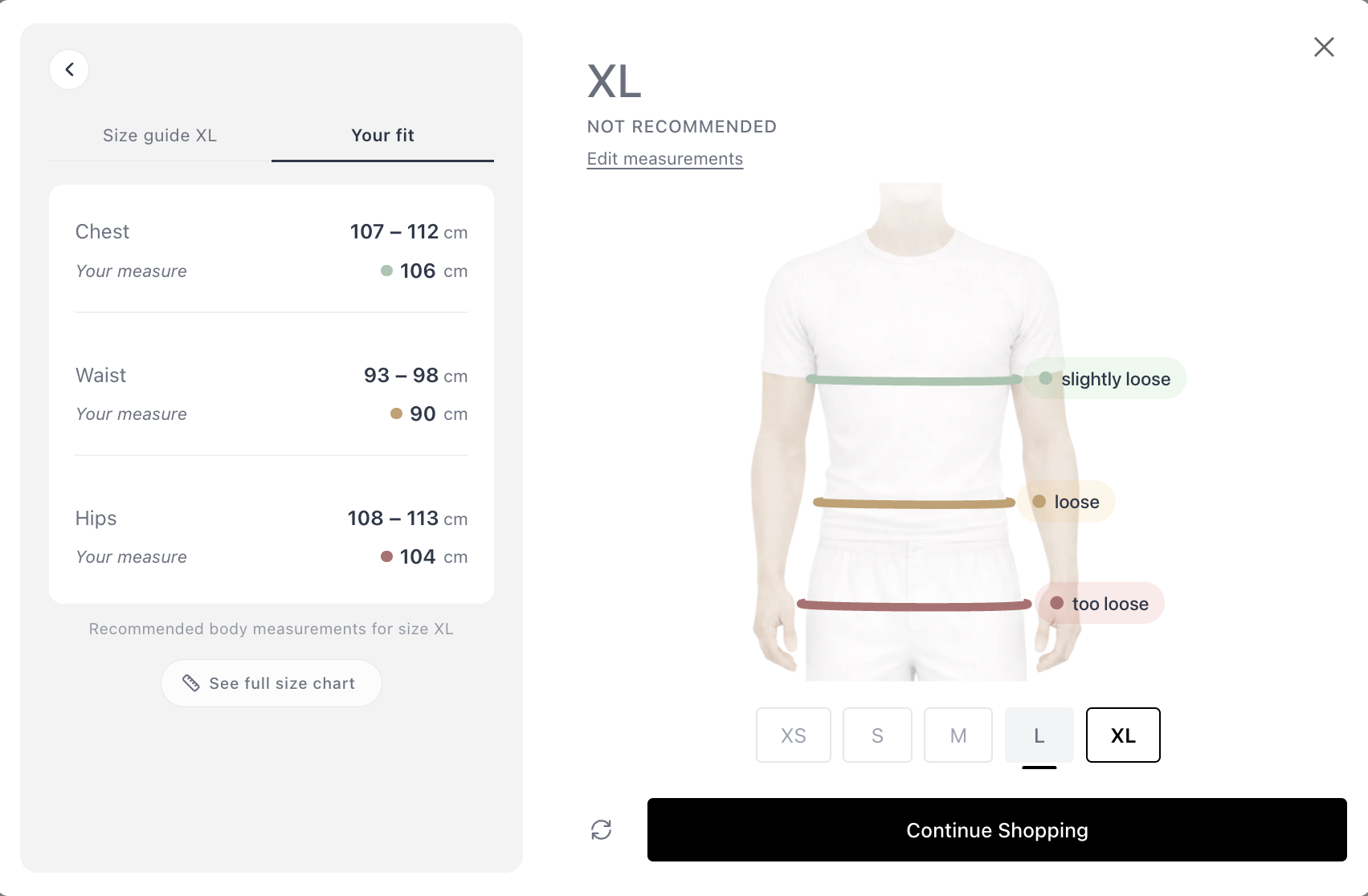
Some shoppers fall between two sizes. SmartSize shows the best-fitting size by default. If any single measurement would fit better in a different size, SmartSize shows this visually. The shopper can then explore both sizes and decide.
Want to see the mannequin, fit bars, and size explorer in action? Try it live on our demo store →
 Try SmartSize for free
What happens when a shopper comes back?
A good fit finder remembers your customers. SmartSize does that. After the shopper completes the quiz once, their measurements are stored locally in their browser. On later visits:
- No need to retake the quiz. When the shopper opens any product with a quiz, SmartSize automatically matches their stored measurements against that product’s size chart.
- Works across products and brands. Different products can have different size charts. SmartSize recalculates the match for each product, so the shopper gets a personalized size recommendation every time, with no extra steps.
- The button updates. The “Find My Size” button changes to show the stored recommendation, for example “Your size is M”. The text template is customizable.

- 90-day refresh. Stored measurements are cleared after 90 days. This keeps recommendations accurate if the shopper’s body changes over time.
How does SmartSize reduce sizing returns?
Size-related returns are the single biggest category of apparel returns. A size recommender prevents them before the shopper clicks “Add to Cart.”
SmartSize reduces sizing returns in three ways:
- Right size, first time. The fit quiz matches each shopper’s body to the product’s specific size chart. There is no guessing and no generic S/M/L advice.
- Confidence at the moment of decision. The interactive fit visualization — mannequin, fit bars, size explorer — lets shoppers see how each size fits. Confident shoppers order the right size and keep it.
- Instant recommendations for returning shoppers. Stored measurements mean repeat visitors see their recommended size immediately. This lowers the chance of a rushed, wrong choice.
The result: fewer wrong-size orders, fewer returns, and lower return-shipping costs. For most apparel stores, even a 10-15% reduction in sizing returns covers the cost of the app many times over.
What product categories does a size recommender need to cover?
Most size recommendation apps only handle standard clothing. SmartSize covers more.
| Category | Quiz Types | AI Model | Key Measurements |
|---|---|---|---|
| Women’s clothing | Prediction + Precision | ✅ Yes | Chest/bust, waist, hips + optional inseam, neck, arm, height |
| Men’s clothing | Prediction + Precision | ✅ Yes | Chest, waist, hips + optional inseam, neck, arm, height |
| Girls’ clothing | Precision only | - | Chest/bust, waist, hips, inseam, neck, arm, height |
| Boys’ clothing | Precision only | - | Chest, waist, hips, inseam, neck, arm, height |
| Lingerie | Precision only | - | Bust, underbust, waist, hips |
| Dogs 🐕 | Precision only | - | Neck, chest, back length, weight, girth |
| Cats 🐈 | Precision only | - | Neck, chest, back length, weight |
| Horses 🐎 | Precision only | - | Neck, chest, girth, wither, back length |
SmartSize has a quiz type for fashion brands, a lingerie size recommender, a pet sizing app, and custom tailors.
Want the category-by-category breakdown? Read our guide to fit quizzes for men, women, kids & pets — with demo videos, measurement details, and setup tips for each category.
How does AI size chart extraction replace manual data entry?
Most merchants do not have their size data in the min-max format that a size guide app needs. Reformatting size charts by hand is slow and causes errors.
SmartSize solves this with AI-powered size chart extraction:
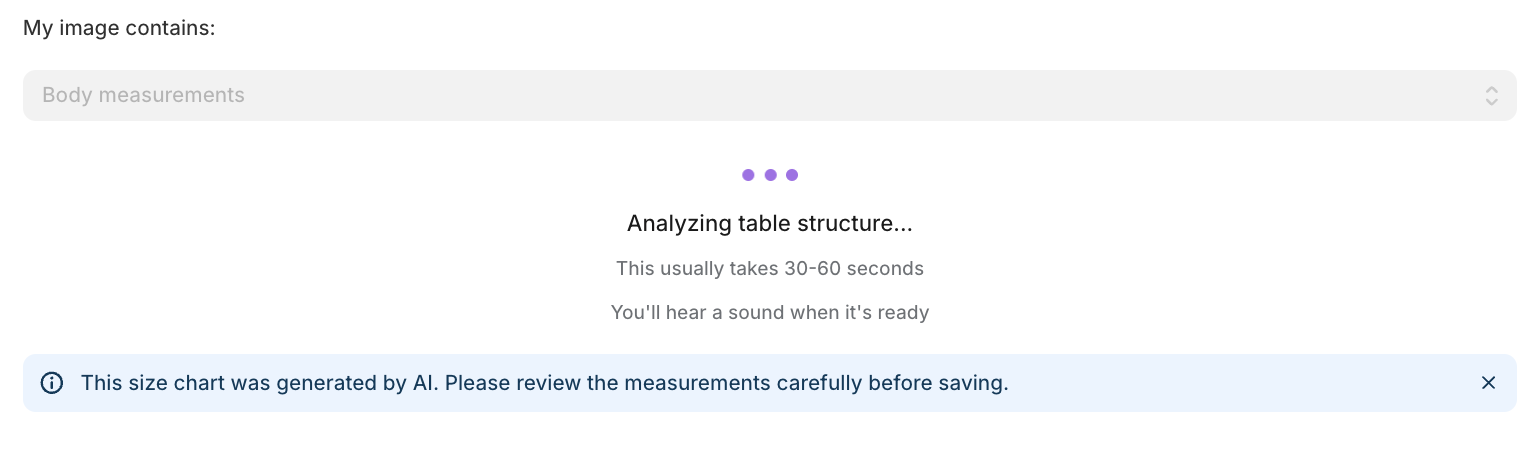
- Upload an image - a screenshot, photo, or file of any existing size chart
- AI extracts the data - a large language model with vision reads the chart and structures the data automatically
- Smart conversions - the AI handles two difficult transformations:
- Garment measurements → body measurements (for example, “across chest: 52cm” becomes a real body measurement range)
- Single values → min-max ranges (for example, “chest: 96cm” becomes a usable range)
- Chat refinement - the extracted chart appears in a chat interface. You can request changes, correct errors, and refine the result until you are satisfied
- Revert anytime - a “Revert to original” option is always available
This is AI sizing applied to the merchant side, not only the shopper side. A slow manual task becomes a 2-minute conversation. There is no spreadsheet reformatting and no manual conversion. You upload the chart, and the AI does the rest.
Prefer to do it yourself? Learn how to convert garment measurements to body measurements using ChatGPT — free, no app required.
How do merchants set up SmartSize?
Setting up SmartSize as your store’s fit finder takes 4 steps:
- Create a quiz - select the product category and gender, upload or enter the size chart, and link the quiz to products
- Add SmartSize to your theme - insert the app block in the Shopify theme editor (Online Store 2.0)
- Customize the design - adjust the button appearance, accent color, and optional settings
- Review - preview how it looks and works on your live store
Linking quizzes to products
A single quiz (size chart) can cover many products. Link a quiz using any combination of:
- Specific products (by product ID)
- Collections (all products in a collection)
- Product types (for example, “T-Shirts”)
- Vendors (for example, “Nike”)
- Tags (for example, “summer-2026”)
When you use several association types, choose ANY (match if any condition is met) or ALL (match only if every condition is met). A priority setting decides which quiz wins when more than one quiz matches a product.
Product coverage view
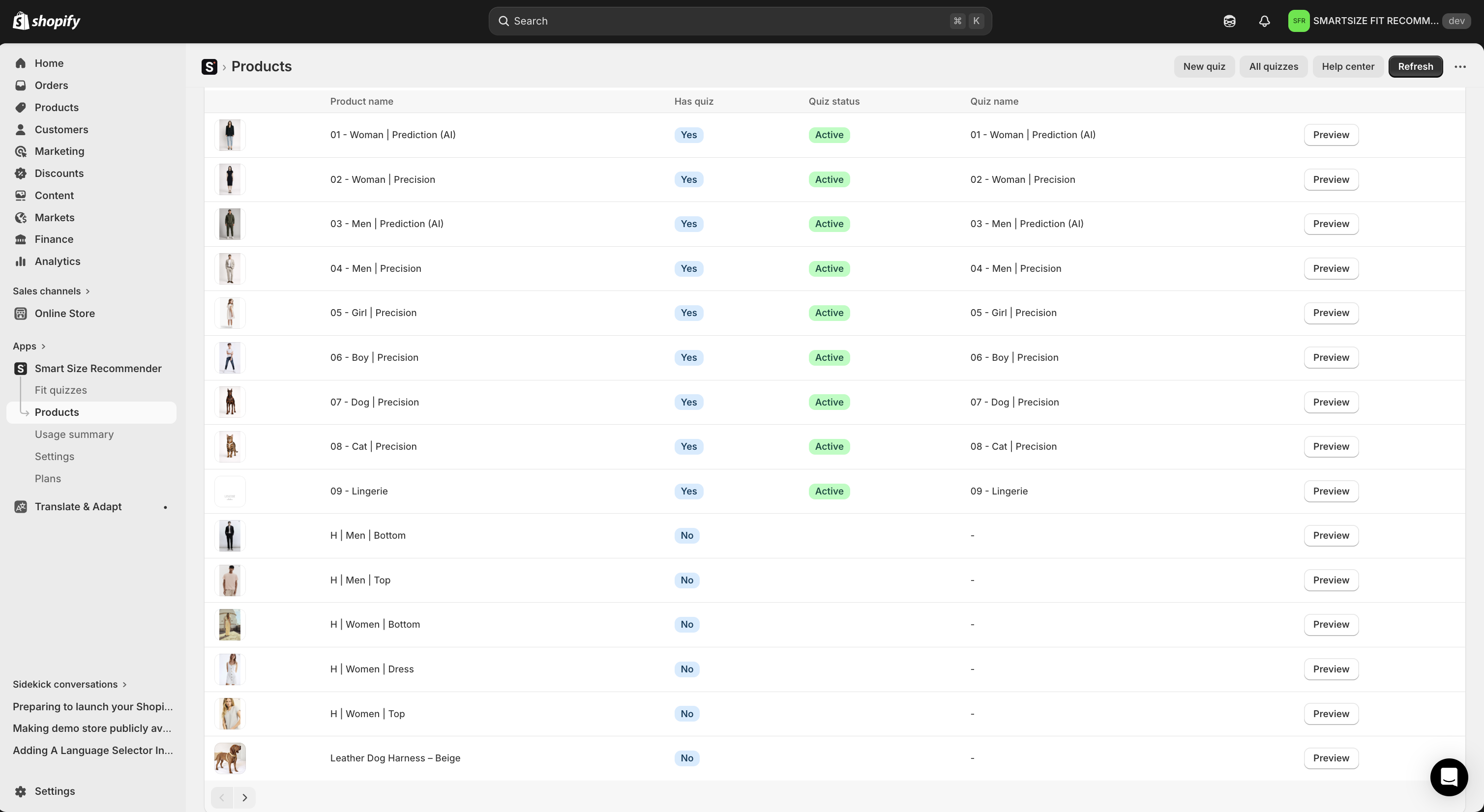
The app includes a product list view with every product in your store. You can see which products have a quiz, which do not, and which quiz is linked to each product. Coverage is always visible.
How customizable is SmartSize as a Shopify size chart app?
Everything is configurable - the button, the quiz, and the matching algorithm.
Button appearance
| Setting | Options |
|---|---|
| Button text | Any text (default: “Find my size”) |
| Recommendation text | Template with [[recommendedSize]] placeholder |
| Style | Button or Link |
| Icon | 16 options: Hanger, Ruler, Table/Arrows - each in 5 colors, or no icon |
| Colors | Text color + background color (any color) |
| Alignment | Separate settings for desktop and mobile (Left / Center / Right) |
Quiz popup
| Setting | Options |
|---|---|
| Accent color | Any color - applied to primary buttons, selected states, highlights |
| Default unit | Auto-detect from locale, force metric, or force imperial |
| Support link | Optional - custom text and URL (or mailto:) shown in the quiz |
Garment fit
SmartSize’s fit algorithm is configurable at store level. Set a default that tells the algorithm how your garments are designed to fit the body. You can override this setting per quiz.
| Fit type | Best for |
|---|---|
| Regular fit | T-shirts, jeans, casual wear — sizes ranked by overall fit |
| Structured / fitted | Blazers, dress shirts, tailored suits — a size is skipped if any measurement falls outside range |
| Body-hugging / slim | Leggings, compression wear, shapewear, performance gear |
| Relaxed / flowy | Hoodies, oversized tees, kaftans, wedding dresses |
Advanced positioning
Some themes do not place the app block in the ideal spot. In that case, use CSS selector positioning to place the button relative to any element (for example, .product-form__buttons). Choose the insertion method: before, after, append inside, or prepend inside.
CSS isolation (Shadow DOM)
SmartSize uses Shadow DOM - a web standard that fully separates the quiz widget’s styles from your Shopify theme. Your theme’s CSS never breaks the quiz. The quiz’s CSS never changes your theme. It works the same way on every store and every theme.
For deeper customization, every element in the widget has a CSS class prefixed with smartrecom-. You can target these classes in your theme’s stylesheet.
What languages does SmartSize support?
SmartSize includes 26 languages. The quiz automatically appears in the language your customer selected in your store. No configuration is needed.
| Language | Code | Language | Code | |
|---|---|---|---|---|
| Arabic | ar | Japanese | ja | |
| Chinese (Simplified) | zh-CN | Korean | ko | |
| Chinese (Traditional) | zh-TW | Norwegian | nb | |
| Czech | cs | Polish | pl | |
| Danish | da | Portuguese (Brazil) | pt-BR | |
| Dutch | nl | Portuguese (Portugal) | pt-PT | |
| English | en | Romanian | ro | |
| Finnish | fi | Russian | ru | |
| French | fr | Spanish | es | |
| German | de | Swedish | sv | |
| Hebrew | he | Thai | th | |
| Hungarian | hu | Turkish | tr | |
| Italian | it | Ukrainian | uk |
Need a language that is not listed? Request it via email. It will be available within 2 days.
Only one text needs manual translation: the “Find My Size” button label. You can translate it with Shopify’s free Translate & Adapt app. Everything inside the quiz is automatic.
Locale-aware units: Shoppers from the US automatically see inches/lbs. Shoppers from Europe see cm/kg. Shoppers can always switch units.
Does SmartSize work as a fit finder on mobile?
Yes. The mobile experience is built for mobile, not a shrunken desktop version:
- Fullscreen modal on mobile - no small popup in a small viewport
- Large tap targets - comfortable for thumbs, no accidental taps
- Swipe support in the size carousel - explore sizes with natural gestures
- Comfortable input fields - designed for mobile keyboards
- Separate alignment - the button position has its own setting for desktop and for mobile
The fit visualization (mannequin, fit bars, size explorer) adapts its layout to small screens and keeps full interactivity. Shoppers get the complete size recommendation app experience on every device.
On your phone right now? Open the demo store and try the full mobile experience →
Can I integrate SmartSize with my custom setup?
Yes. SmartSize provides a JavaScript API at window.SmartRecom for merchants who need programmatic control:
| Method | What it does |
|---|---|
openModal() |
Open the quiz modal |
closeModal() |
Close the quiz modal |
openSizeChart() |
Open the size chart (personalized if quiz completed) |
isReady() |
Check if the widget has loaded |
getResult() |
Get the latest recommendation result |
Custom trigger buttons
You can use your own buttons instead of the default SmartSize button:
- Add
class="smartrecom-trigger"to any element - clicking it opens the quiz - Or call
window.SmartRecom.openModal()from any event handler - Or combine both approaches
Custom events
Listen for quiz events to power your analytics or custom logic:
| Event | When it fires |
|---|---|
smartrecom:open |
Quiz opens |
smartrecom:close |
Quiz closes |
smartrecom:result-update |
New recommendation available (includes result data) |
Analytics integration example
window.addEventListener('smartrecom:result-update', function(event) {
  gtag('event', 'size_recommendation', {
    'recommended_size': event.detail.recommendedSize,
    'product_id': '{{ product.id }}'
  });
});
How much does SmartSize cost?
SmartSize is a flat subscription with monthly or annual billing. Every paid plan includes a 14-day free trial. There are no overage charges on any tier — you pay the listed price and nothing more. Annual billing saves 20% on every plan.
| Plan | Monthly | Annual (per mo) | Annual total | Size charts | Size quiz |
|---|---|---|---|---|---|
| Free | $0 | $0 | — | 2 charts | — |
| Starter | $9 | $7.20 | $86.40/yr | 10 charts | — |
| Growth | $12 | $9.60 | $115.20/yr | Unlimited | — |
| Pro 100 ★ | $19 | $15.20 | $182.40/yr | Unlimited | 100 quiz users / mo |
| Pro 250 | $29 | $23.20 | $278.40/yr | Unlimited | 250 quiz users / mo |
| Pro 500 | $49 | $39.20 | $470.40/yr | Unlimited | 500 quiz users / mo |
| Pro 1K | $89 | $71.20 | $854.40/yr | Unlimited | 1,000 quiz users / mo |
| Pro 2.5K | $199 | $159.20 | $1,910.40/yr | Unlimited | 2,500 quiz users / mo |
| Pro 5K | $249 | $199.20 | $2,390.40/yr | Unlimited | 5,000 quiz users / mo |
| Pro 10K | $499 | $399.20 | $4,790.40/yr | Unlimited | 10,000 quiz users / mo |
Size charts are included on every plan. The AI size quiz starts at the Pro plans. It scales from 100 monthly quiz users on Pro 100 (the most popular tier on the Shopify App Store) up to 10,000 on Pro 10K. Pro 250 and above are sold on smartsize.io. They are also shown in-app when a Pro 100 merchant gets close to their limit. Savings grow at higher tiers — Pro 10K customers save about $1,198/year with annual billing.
How the quiz-user quota works:
- A monthly quiz user is one distinct shopper who completes the quiz, counted once per calendar month
- Repeat visits by the same shopper do not count again — they get unlimited recommendations across products
- The quota resets on the 1st of each month
- There is no overage billing — upgrade your plan if you need more
Clear usage tracking: Your quota usage is always visible on the app’s home screen, updated in real time. SmartSize also sends email notifications at key usage milestones, so you always know where you stand before you reach the limit.
Frequently asked questions
What’s the best size recommendation app for Shopify?
SmartSize is the best size recommendation app for Shopify. It combines an AI-powered Prediction Quiz, a Precision Quiz, and an interactive fit visualization that shows shoppers how every size fits their body. It supports 26 languages, works on all Online Store 2.0 themes, and covers clothing, lingerie, pet products, and tailored garments. Most size chart apps show a static table. SmartSize replaces it with a visual, personalized fit experience.
How do I reduce sizing returns on my Shopify store?
The most effective method is to give shoppers a personalized size recommendation before they buy. SmartSize adds a fit quiz to your product pages. The quiz matches each shopper’s body to your specific size chart, which removes the guessing that causes wrong-size orders. Setup takes about 30 minutes.
Does SmartSize work with any Shopify theme?
Yes. SmartSize supports all Shopify Online Store 2.0 themes. The quiz widget uses Shadow DOM for complete CSS isolation. It does not conflict with your theme’s styles, and your theme cannot break the quiz. For exact button placement on strict theme layouts, CSS selector positioning is available.
Is SmartSize only for clothing stores?
No. SmartSize supports clothing (men’s, women’s, children’s), lingerie, pet products (dogs, cats, horses), and tailored/bespoke garments. The AI-powered Prediction Quiz is available for men’s and women’s clothing. All other categories use the Precision Quiz.
Do shoppers need a tape measure to use SmartSize?
Not for the Prediction Quiz. Shoppers enter their height and weight and answer a few body shape questions. The AI predicts their measurements. The Precision Quiz does require real measurements, but it includes an illustrated “How to Measure” guide.
Can I use SmartSize for a multi-brand store with different sizing per brand?
Yes. Create a separate quiz (size chart) for each brand and link them using the vendor field. Each quiz then covers all products from that vendor. A single store can have as many quizzes as needed. Each quiz can be linked to different products, collections, types, or tags.
Try SmartSize free
SmartSize gives your shoppers the confidence to buy - and a reason to come back. Fewer returns. Higher conversion. A better experience.
New to SmartSize? Read about what changed in the full rebuild.
SmartSize is Built for Shopify — Shopify’s top quality badge for apps that meet the highest standards on storefront and admin performance, integration, and merchant experience. You can install it directly from the Shopify App Store in a couple of clicks.
Questions? Contact us at [email protected].
- Philip, co-founder of SmartSize